
How to Get a Job at Google – Insider Guide for 2025
A complete 2025 guide to getting hired at Google, with expert tips, job search tactics, and AI tools to streamline your journey.
Getting a job at Google is a dream for many – and for good reason. Ranked consistently among the world’s best employers, Google offers top-tier salaries, meaningful projects, a collaborative culture, and perks that redefine workplace benefits. But with over two million applications received each year and acceptance rates rumored to be lower than at Ivy League schools, landing a role at Google is anything but easy.
So how do you stand out from a sea of applicants – especially in 2025, when AI tools, remote-first roles, and evolving hiring standards have changed the game?
This guide breaks down exactly how to get a job at Google – whether you’re targeting a tech role like software engineering or data science, a non-technical role in marketing or product, or looking for internships as a student or recent grad.
We’ll walk through Google’s hiring philosophy, the types of roles available, how to find and tailor applications, what to expect from interviews, and how to leverage smart tools to give yourself an edge.
By the end, you’ll know what Google really looks for – and how to approach your application strategically, confidently, and effectively.
Understanding Google’s Hiring Philosophy
If you want to get hired at Google, understanding how they evaluate talent is just as important as your technical skills or resume. Google’s hiring process is rooted in a distinct philosophy that prioritizes potential, adaptability, and alignment with the company’s core values.
“Google isn’t just hiring for skills. They’re hiring for mindset – people who learn fast, think independently, and collaborate across teams.”
– Emma D., former Google recruiter
What Does “Googleyness” Actually Mean?
One of the first terms you’ll hear when researching how to get a job at Google is “Googleyness.” It’s not just a buzzword – it’s a real assessment factor in the hiring process. But what does it mean?
Googleyness typically includes traits like:
- A collaborative and low-ego approach to teamwork
- Intellectual humility and a willingness to learn
- Comfort with ambiguity and fast-changing environments
- A strong sense of ethics and inclusivity
- Creative problem-solving and a bias for action
Candidates who embody Googleyness aren’t just technically qualified – they’re curious, adaptable, and thoughtful about how they work with others.
Skills Over Degrees
Google famously dropped its formal degree requirement for many roles, especially in tech. While educational background still plays a role, demonstrated ability now outweighs pedigree. If you can show that you can do the job – through projects, open-source contributions, bootcamp experience, or strong communication – you’ll be considered.
This makes Google an especially good target for candidates coming from non-traditional backgrounds or career-switchers who have the right mindset and capabilities.
Structured Hiring for Bias Reduction
Another unique part of the Google hiring process is its structured approach. Interviews follow standard frameworks and scorecards designed to reduce bias. Multiple interviewers are involved, and hiring committees review feedback before a decision is made. This helps ensure every candidate gets a fair shot based on skill, not connections or charisma.
What does that mean for you as an applicant?
- Prepare for behavioral and situational questions
- Be ready to explain how you think, not just what you know
- Demonstrate values-alignment, not just experience
Google Wants Problem-Solvers
Google looks for people who can tackle big, complex problems. Whether you’re an engineer solving for scale or a marketer designing a growth campaign, what matters most is your approach to challenges – how you break them down, collaborate with others, and iterate on solutions.
If you can show strong problem-solving abilities, willingness to learn, and emotional intelligence, you’re already halfway to meeting Google’s internal bar.
Types of Jobs at Google
Whether you’re a software developer, product marketer, UX designer, or recent grad just entering the workforce, Google has a broad range of roles – and they’re not all about coding. Understanding the different career paths available can help you find the best match based on your background, strengths, and ambitions.
Tech Roles at Google
Google is, first and foremost, a tech company. It hires thousands of engineers and technical specialists across disciplines. Common tech roles include:
- Software Engineer: The most common technical position, focused on designing, building, and maintaining scalable software systems.
- Site Reliability Engineer (SRE): Focuses on infrastructure and making systems reliable, efficient, and scalable.
- Data Scientist / Machine Learning Engineer: These roles use data to train models, build analytics pipelines, and support product teams with insights.
- UX Engineer / Designer: Blends technical and design skills to improve user experience across platforms.
- Technical Program Manager (TPM): Coordinates complex projects across engineering and product teams, ensuring timely execution.
Non-Tech Roles at Google
You don’t need to be a coder to get a job at Google. In fact, a significant percentage of employees work in non-technical roles. These include:
- Product Manager (PM): Owns the strategy, roadmap, and execution of products, working cross-functionally with engineers and designers.
- Marketing Specialist: Promotes products, builds campaigns, and works on brand storytelling.
- Sales & Customer Success: Helps Google’s clients and advertisers succeed using its tools (think: Google Ads, YouTube, Cloud).
- Human Resources / People Operations: Google’s HR is famous for being highly data-driven and focused on employee well-being.
- Legal & Policy: Works on issues like data privacy, copyright, and global compliance.
Most of these roles exist across Google’s product areas – from Search and Maps to Android and Google Cloud.
Internships & Entry-Level Programs
If you’re just starting your career, Google’s internships and rotational programs offer a strong way in. These are competitive, but designed to open doors for students and new grads:
- Google STEP Internship: For first- and second-year undergraduate students with a passion for computer science.
- BOLD Internship: For non-tech students in business-related majors (marketing, finance, people ops).
- Associate Product Manager (APM) Program: A two-year rotational program for aspiring PMs.
- Residency Programs: In UX design, research, and data analytics.
Each internship or entry-level track comes with mentorship, clear learning goals, and (often) a pathway to full-time employment.
Where to Find Google Job Openings
If you’re serious about working at Google, knowing where to search – and how – is half the battle. The company posts its roles in multiple places, but you’ll need more than just browsing job boards to get noticed. Here’s where to focus your search and how to approach each platform effectively.
1. careers.google.com (Official Google Careers Page)
This is Google’s primary job portal and the most reliable source of truth. You can search by:
- Location (remote, hybrid, on-site)
- Team (e.g., Google Cloud, YouTube, Waymo)
- Role type (internship, full-time, contract)
- Job function (engineering, sales, legal, etc.)
Each job listing gives you a detailed breakdown of responsibilities, qualifications, and team context. You can apply directly through your Google account and track your submissions. For early-career applicants, check the “Students” section to view internships and graduate programs.
2. LinkedIn Jobs
LinkedIn is an excellent place to discover Google roles, especially if you’re looking for networking opportunities. Many recruiters post informal updates or share open roles not listed on the main site yet.
- Use filters like “Company: Google” and “Experience level: Entry” to narrow results.
- Connect with Googlers who are active in your desired department and ask thoughtful questions.
- Save roles to your job tracker and engage with company content to stay top-of-mind.
3. University Career Portals
For students, your college’s career center or job portal often lists internships and Google info sessions. Google partners with top universities globally through its Google University Programs, offering resume reviews, coding challenges, and meetups. Check if your school has:
- A dedicated Google career contact
- On-campus tech talks or info sessions
- Internship fairs with Google participation
4. Employee Referrals
Referrals remain one of the most effective ways to get an interview. Employees can refer you internally, which often gets your application reviewed faster. Tips to get a referral:
- Join alumni or tech communities where Googlers are active.
- Ask contacts for an informational call before requesting a referral.
- Make sure your resume is tailored and clear before they submit.
How to Tailor Your Resume and Cover Letter for Google
When applying to Google, generic applications won’t cut it. Each role receives hundreds – sometimes thousands – of applications. To stand out, your resume and cover letter must speak directly to the job, the team, and Google’s values. Here’s how to get it right.
Understand What Google Looks For
Google hiring teams focus on:
- Impact and results, not just responsibilities
- Problem-solving skills and initiative
- Cross-functional collaboration
- Alignment with Google’s values (aka “Googleyness”)
Instead of saying “Managed a social media calendar,” say:
“Launched a data-driven campaign across 3 channels, increasing engagement by 34% in 6 weeks.”
Use the STAR method (Situation, Task, Action, Result) for bullet points – especially if you’re applying to roles in Product, Marketing, or Strategy.
Formatting Tips for Google Applications
- Keep your resume clean and minimal (1 page for early-career, 2 max for experienced roles).
- Use sans-serif fonts (like Arial, Roboto, or Helvetica).
- No need for flashy visuals – Google uses ATS software to parse resumes.
- Quantify your achievements and emphasize collaboration and initiative.
Cover Letters: Optional but Powerful
While cover letters aren’t always required, submitting one can give you a competitive edge – especially when switching industries or applying to non-technical roles.
Your cover letter should:
- Explain why you want to join Google, not just why you’re a fit
- Highlight 1-2 major achievements relevant to the job
- Show you’ve done your homework (mention a recent product, value, or project)
How LiftmyCV Helps with Google Applications
If crafting tailored applications sounds time-consuming – that’s because it is. Tools like LiftmyCV’s AI Cover Letter Generator and Auto-Apply Engine make this process faster and more strategic.
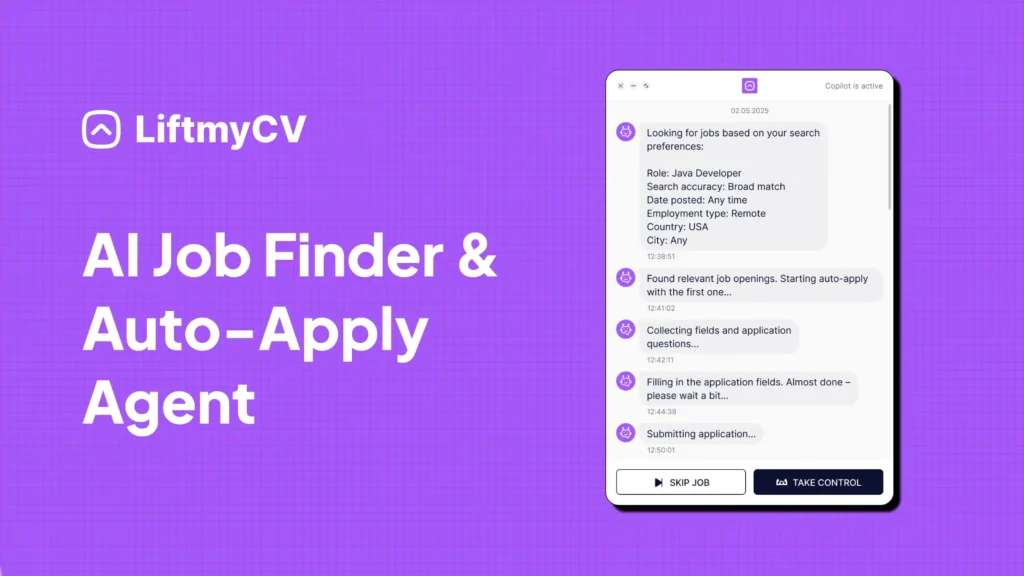
LiftmyCV analyzes each job description, auto-detects the required skills (both hard and soft), and generates optimized resumes and cover letters using the latest GPT models. It also:
- Autofills job application forms (especially useful for Google’s longer applications)
- Tracks your submissions and lets you manage follow-ups
- Works with LinkedIn and major job boards
Bonus: You can try it risk-free with 3 free applications. No credit card required.
Google’s Interview Process Explained
Landing an interview at Google is a big milestone. But understanding the process ahead of time can give you a huge advantage – especially if it’s your first time applying to a top-tier tech company. Google’s hiring funnel is rigorous but structured. Here’s how it typically works:
1. Application Review
Once you submit your resume and cover letter through Google Careers or via a referral, it goes through a combination of:
- Applicant Tracking System (ATS) scanning
- Recruiter screening to assess fit for the role
- Team-based evaluation (in some cases)
Tip: Ensure your resume is keyword-optimized – especially for the specific job title and responsibilities. This is where using a tool like LiftmyCV can give you a head start by improving your ATS score automatically.
2. Recruiter Call
If your application stands out, a Google recruiter will reach out for a 15-30 minute introductory call. During this call, they’ll:
- Ask basic questions about your background and interests
- Explain the role, team, and next steps
- Provide tips on preparing for interviews
3. Phone Interviews
Depending on the role, you may do one or more phone (or video) interviews. These are split into:
- Technical interviews – for software engineers, data scientists, etc. Expect live coding, algorithm challenges, or system design.
- Behavioral interviews – for all roles. Focuses on past experiences, decision-making, and teamwork.
Expect to walk through real projects you’ve worked on and explain your process clearly.
4. On-Site or Virtual Loop Interviews
If you pass the phone rounds, Google will schedule a “loop” – a series of back-to-back interviews (usually 3-5) with different team members. These interviews are deeper dives and vary based on role.
For example:
- A marketing applicant might be asked to design a campaign for a new Google product.
- A product manager might outline a product roadmap or evaluate a go-to-market strategy.
These sessions assess:
- Problem-solving and creativity
- Communication and collaboration
- Cultural fit and adaptability
5. Hiring Committee & Team Match
After the interviews, your performance is reviewed by a Hiring Committee – a group of Google employees trained to make fair, unbiased hiring decisions. If approved, you may then go through a Team Match process to find the right department or project.
6. Offer or Feedback
If everything goes well, you’ll receive a formal offer. If not, you’ll typically get feedback – and may be invited to reapply later. Google often keeps strong candidates in a talent pool for future roles.
Sample Google Interview Questions (and How to Tackle Them)
Google interviews are designed to test both your technical know-how and your ability to think critically, communicate clearly, and collaborate effectively. They’re not just looking for skills – they’re looking for structured thinking and “Googleyness.” Below are some of the most common types of questions, along with examples and tips to prepare:
1. Behavioral Questions
These are a staple across all roles at Google. Interviewers want to understand how you’ve handled real situations in the past – because past behavior is often the best predictor of future performance.
Examples:
- “Tell me about a time you had to persuade someone to see things your way.”
- “Describe a situation where you failed. What did you learn?”
- “Give an example of when you had to learn something quickly.”
Tip: Use the STAR method (Situation, Task, Action, Result) to structure your answers clearly.
2. Role-Specific Problem-Solving
These vary based on the position you’re applying for, but the principle is the same: Google wants to see how you approach unfamiliar problems.
Examples:
- Marketing Role: “How would you launch a new YouTube feature to Gen Z users?”
- Product Management: “You’re the PM for Google Maps. What would you improve and why?”
- UX Design: “How would you design a new onboarding experience for Google Docs?”
Tip: Don’t rush to answer. Instead, walk the interviewer through your thought process. Think aloud and ask clarifying questions.
3. Technical Questions
For software engineering and data science roles, these are non-negotiable. Expect to whiteboard (virtually or in-person) algorithms, write code, and solve systems design challenges.
Examples:
- “Write a function to find the longest palindrome in a string.”
- “Design a URL shortening service like bit.ly.”
- “Explain how you would optimize database performance in a high-traffic web app.”
Tip: Practice on platforms like LeetCode, Exponent, or Pramp. Use mock interviews with peers or AI tools like ChatGPT to simulate real-time coding.
4. Hypothetical Scenarios
These are used to evaluate creative thinking, prioritization, and cultural alignment.
Examples:
- “If you were CEO of Google for a day, what would you change?”
- “How would you explain Google Cloud to a 6-year-old?”
Tip: These aren’t trick questions. The goal is to understand how you frame problems and articulate ideas.
How to Prepare for Google Interviews Without Burning Out
Let’s face it – preparing for Google interviews is a marathon, not a sprint. The process can take weeks or even months, depending on the role and your schedule. But with the right strategy and tools, you can make your preparation both effective and manageable.
1. Practice Behavioral Interviews with Real Frameworks
Google interviewers rely heavily on behavioral questions to evaluate how you think, work, and solve problems. The STAR method (Situation, Task, Action, Result) is your best friend here.
Try this: Write down 5-7 work or school experiences where you made a measurable impact. Turn each one into a STAR story and rehearse aloud. If you’re short on experience, include side projects, volunteer work, or group efforts.
2. Simulate Technical Interviews
For tech roles, there’s no replacement for hands-on coding. Google uses a mix of data structures, algorithms, and system design questions – and expects you to think out loud while solving them.
Even if you’re not applying for a hardcore coding role, practicing logic problems can sharpen your problem-solving skills for product and strategy interviews.
3. Leverage ChatGPT and AI Tools for Interview Prep
AI is your interview wingman in 2025. Use tools like ChatGPT to:
- Practice mock interviews with real-time feedback
- Generate STAR-style responses from resume entries
- Rephrase and refine your answers for clarity and tone
Tip: You can even ask ChatGPT to act as a Google hiring manager and ask you a round of 5 questions.
4. Peer Reviews and Communities
Sometimes, a second pair of eyes makes all the difference.
- Join Slack or Discord communities focused on tech interviews
- Schedule practice sessions with friends or mentors
- Ask peers to review your resume or conduct a mock interview
You’ll gain fresh perspectives, uncover blind spots, and build confidence.
5. Set a Weekly Practice Schedule
Treat preparation like training for a marathon. Instead of cramming 6-hour blocks the week before, spread out your efforts over 3-4 weeks. For example:
- Week 1-2: Focus on technical refreshers or case studies.
- Week 3: Practice behavioral questions and refine your STAR stories.
- Week 4: Mock interviews and time-bound practice.
This approach builds confidence over time – without draining your motivation.
How AI Tools Like LiftmyCV Can Streamline Your Google Job Hunt
Applying to Google is no ordinary task – it’s often a high-stakes, multi-step process that demands precision, customization, and stamina. Between optimizing your resume, crafting cover letters from scratch, and keeping track of dozens of open roles, the workload can feel overwhelming.
That’s where smart job search tools like LiftmyCV come in – to take the friction out of the process, reduce the manual labor, and help you focus on the parts that matter most: preparation and performance.
1. AI-Generated Cover Letters (Tailored to Each Role)
Google doesn’t respond well to generic templates. Every job opening has unique language, tone, and priorities – and your cover letter needs to reflect that. With LiftmyCV’s AI Cover Letter Generator, you can automatically generate a personalized, role-specific cover letter in seconds. It scans the job description, pulls relevant skills from your profile, and writes a compelling, human-sounding letter – no more guessing, copying, or pasting.
2. Resume Optimization That Speaks Google’s Language
Google uses advanced applicant tracking systems (ATS) to sort and filter candidates. If your resume doesn’t match the keywords or role expectations, it may never be seen. LiftmyCV uses GPT-4o to rewrite and restructure your resume content – highlighting achievements, embedding relevant skills, and improving alignment with the job description. The result? Higher ATS scores and more interviews.
3. Auto-Apply Across Multiple Platforms (Yes, Including LinkedIn)
With LiftmyCV’s AI Auto-Apply Tool, you can apply to Google jobs directly through LinkedIn or other platforms like Monster, Workable, and Lever. Just set your filters (location, role, visa sponsorship), and the tool will:
- Search for relevant openings
- Fill in your resume and cover letter
- Submit your applications
- Track where and when you applied
All from a single dashboard – no spreadsheets needed.
4. Flexible Pricing That Fits Your Workflow
LiftmyCV doesn’t force you into monthly plans. You can use it entirely on a pay-as-you-go model, purchasing credits only when you need them. Every new user also gets 3 free AI-powered applications to try the tool risk-free.
5. Choose Between Autopilot and Copilot Modes
LiftmyCV adapts to your preferred workflow.
- Autopilot mode runs job applications entirely on its own, perfect for those who want to apply at scale with zero friction.
- Copilot mode lets you approve and tweak every application before it’s submitted – ideal for high-stakes roles like those at Google.
BONUS VIDEO: How to Apply for a Job at Google
Final Thoughts: Getting Hired at Google Takes Strategy – and Endurance
There’s no sugarcoating it – getting a job at Google is competitive. But it’s not impossible. Every year, thousands of candidates land roles across engineering, marketing, UX, and operations because they approached the process with clarity, patience, and the right preparation.
If there’s one key takeaway, it’s this: Google isn’t just looking for the “smartest person in the room.” It’s looking for problem solvers, team players, and people who align with its mission. If you can demonstrate that – on your resume, in your interviews, and through your story – you’re already ahead of 90% of applicants.
So what can you do next?
- Start refining your resume and cover letter today
- Practice your STAR stories and system design questions
- Use tools that make the job hunt easier, not harder
Start now with LiftmyCV – generate tailored applications, optimize your job seeker profile for Google’s high standards, and apply smarter – not just faster.
Remember, this journey is yours – make it count.


FAQ
Is it hard to get a job at Google?
Yes – Google receives millions of applications, but with the right preparation and strategy, it’s possible to stand out and land interviews.
Do I need a CS degree to work at Google?
No. While a CS degree helps for technical roles, Google also hires for marketing, UX, legal, sales, and operations roles.
What is Googleyness and why does it matter?
Googleyness includes traits like adaptability, creativity, collaboration, and ethical thinking. It plays a big role in culture fit assessments.
How does Google use ATS in hiring?
Google screens resumes using ATS. Tailoring your resume with job-relevant keywords is essential – AI tools like LiftmyCV can help with that.
Can I use AI tools like LiftmyCV to apply?
Yes. LiftmyCV helps you generate tailored cover letters, optimize resumes, and apply to Google roles faster without compromising quality.
How many interview rounds should I expect?
Usually 4-5: recruiter call, phone screens, and on-site or virtual loop interviews with a hiring committee review.
Read Next

How to Get Into Graphic Design and Land Your First Design Job
Choose a design lane, build a three-project portfolio with case studies, and apply while 9,064 graphic design roles are open.
How to Find a Job: The Complete Step-by-Step Guide
How to find a job step by step: where to search, how to get past the ATS, the best way to apply faster, and how to automate your job search with LiftmyCV.

How to Become a Copywriter, From First Sample to First Paid Job
Pick a copy lane, build four samples that prove it, and apply while 1,944 copywriter roles sit open. Pay data and timelines included.