
Multi-Platform Job Search: A Complete Strategy Guide
Optimize your job search strategy across multiple platforms like LinkedIn, Indeed, and more with AI. Compare platforms and apply smarter.
Looking for a job? Here’s the fastest way to get started:
- Use Multiple Platforms: Each platform has unique strengths.
- Leverage AI Tools: Save time and improve results.
- Application Automation: Tools like LiftmyCV auto-fill forms and apply across platforms.
- Resume Builders: Tools like Kickresume optimize your resume for ATS systems.
- Job Matching: AI tools like Talentprise recommend jobs based on your skills.
- Interview Prep: Use simulators like Interview Warmup to practice.
- Optimize Your Profiles and Resumes:
- Tailor each profile (LinkedIn, Indeed, etc.) to the platform’s strengths.
- Make your resume ATS-friendly: use standard fonts, include keywords, and avoid graphics.
- Balance Automation with Personalization:
- AI tools speed up applications, but add personal touches like specific achievements in resumes and tailored cover letters.
- Track and Follow Up:
- Organize your job search in a spreadsheet or app.
- Follow up on applications to stand out.
Quick Comparison of Job Platforms
| Platform | Focus | Best For | Key Features |
|---|---|---|---|
| Networking | Professional connections | Skills endorsements, recommendations | |
| Indeed | Job Listings | Quick applications | Resume upload, keyword optimization |
| Glassdoor | Reviews & Insights | Researching companies | Salary data, company reviews |
| Dice | Tech Industry Roles | IT and software jobs | Technical skills, certifications |
Setting Up Job Profiles on Different Platforms
Main Job Search Platforms
Navigating today’s job market means being active on multiple platforms, each catering to different career goals. Here’s a quick breakdown:
| Platform | Focus | Key Profile Features | Tips for Success |
|---|---|---|---|
| Networking for professionals | Complete profile, skills endorsements, recommendations | Use a professional photo, detailed work history, and engage regularly | |
| Indeed | Job listings aggregator | Resume upload, quick-apply profile | Optimize with keywords, keep summaries concise |
| Glassdoor | Company reviews and insights | Basic profile, salary expectations | Keep work history updated, provide honest reviews |
| Dice | Tech industry roles | Technical skills, certifications | Highlight technical expertise and showcase project portfolios |
To stand out, customize your profiles to make the most of what each platform offers.
Tailoring Profiles Per Platform
Each platform has its own quirks, and 97.4% of Fortune 500 companies rely on Applicant Tracking Systems (ATS) to filter candidates. This makes profile optimization a must. For LinkedIn, focus on these key areas:
1. Professional Headline
“Your headline is the first thing people see when they visit your profile. Instead of using a generic job title, create a compelling headline that captures attention and highlights your unique value proposition” LinkedIn Pulse
2. About Section
“Here’s a secret about the ‘About’ section: It should be less about you and more about what you can do for others – be it for your next job or client” LinkedIn Pulse
3. Visual Elements
Choose a clean, professional photo and include a cover banner that reflects your personal brand. Once your profiles are polished, ensure your resume is ATS-friendly to maximize its reach.
Making Resumes Work with AI Systems
Your resume is just as important as your online profiles. It must appeal to both hiring managers and AI systems. With over 80% of resumes failing ATS screening, following these formatting rules can make a big difference:
“AI solves these challenges by analyzing job descriptions, optimizing wording, and even generating full resume drafts based on best practices. AI tools don’t just help with formatting – they help you market yourself more effectively.”
Ken Elwell LinkedIn Pulse
Key tips for ATS compatibility:
- Stick to standard fonts like Arial, Calibri, or Times New Roman.
- Avoid using headers, footers, tables, or graphics.
- Save your file as .docx or PDF.
- Use reverse-chronological order for work history.
- Incorporate keywords from the job description.
We highly recommend reading our curated blog article, AI Resume Optimization: Key Facts You Should Know, which will help you polish your CV (resume) using best practices to pass ATS systems and land job interviews faster.
Data shows that 55% of job seekers receive positive feedback from employers after submitting AI-optimized applications Zapier.com. This proves how effective these strategies can be in landing interviews.
AI Job Hunting Tools: Find a Job Today
Using AI Tools for Job Applications
AI tools have made job searching faster and easier, allowing applicants to manage 100-200 submissions efficiently before securing a position.
Top AI Job Search Tools
There are several AI tools available today that can simplify the job search process:
| Tool Category | Top Options | Key Features | Price Range |
|---|---|---|---|
| Application Automation | LiftmyCV | Multi-platform submissions, auto-fill forms | $14.99 / 200 Auto-Applies |
| Resume Builders | Kickresume, Teal | AI formatting, keyword optimization | $8.99-23.99/month |
| Job Matching | Talentprise, Sonara | Automated recommendations, skill matching | Free – Premium tiers |
| Interview Prep | Interview Warmup, Huru | Practice sessions, feedback analysis | Subscription |
Among these, LiftmyCV stands out for its ability to automate applications across multiple platforms.
LiftmyCV Features and Benefits
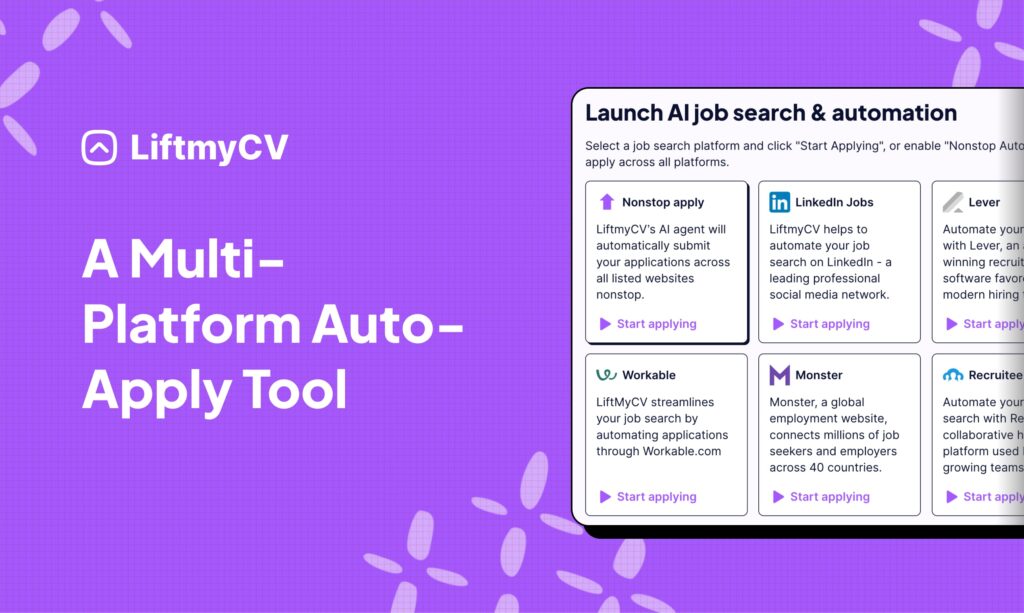
LiftmyCV is a standout tool for streamlining job applications. Its effectiveness is backed by its development process – CEO Dan Zaitsev shared:
“Our engineering team spent over a year refining LiftmyCV to create the best job search AI agent and auto-apply tool on the market” The Globe and Mail.
Here’s what it offers:
- Integration with 9 major job platforms and ATS, including LinkedIn Jobs and Monster
- AI-powered (GPT-4.1) autofill to complete application forms
- Custom filters to focus on specific job roles
- Application limits to maintain quality
- Auto-replies to provide proof of application submissions
How to Set Up AI Auto-Apply Tools: Getting Started with LiftmyCV
- Sign Up & Get Started: Go to LiftmyCV.com and create your free account in just a few clicks.
- Install the Chrome Extension: Download the official LiftmyCV Chrome Extension from the Chrome Web Store to enable seamless job search automation and auto-apple feature.
- Build Your Profile & Upload Your CV: Fill out your work experience, skills, and career preferences – the more details, the better your job matches!
- Activate AI Auto-Apply: Turn on the AI-powered auto-apply feature, and let LiftmyCV search for jobs, fill out applications, and submit them on your behalf – all while you focus on what matters most.
Why Choose LiftmyCV?
- AI-Powered Job Search Automation: Effortlessly find and apply to jobs on LinkedIn Jobs, Lever, Workable, Monster, and +3 more job boards.
- AI Auto-Apply Feature: LiftmyCV automatically fills out job applications and submits your CV on autopilot, eliminating manual effort.
- Nonstop Auto-Apply: When one job board runs out of listings, LiftmyCV seamlessly switches to another, ensuring continuous applications without interruptions.
- Advanced Search Filters: Customize your job search by role, industry, location, and work type (remote, hybrid, or on-site) to match relevant opportunities.
- Flexible Plans for Everyone: Job seekers can choose between a subscription model for unlimited applications or a pay-as-you-go option for full control over their budget.
Get started with automating your job search and auto-applying with AI. No subscription required: liftmycv.com
Tips for Multi-Platform Job Applications
Once you’ve fine-tuned your digital profiles and set up automated applications, the next step is ensuring consistency and quality across platforms. While AI tools can handle the heavy lifting, keeping your branding and strategy aligned is key.
Keeping Your Online Image Consistent
Your personal brand should be uniform across all platforms. Dan Schawbel emphasizes this point:
“If you’re ‘Matt’ on one site, you better be ‘Matt’ on every other site” Mashable.com
Amber Naslund adds:
“Using the same tone of voice will help keep the cohesion. It doesn’t have to be verbatim but there needs to be a certain level of consistency” Mashable.com
Here’s what to focus on:
- Visual and messaging alignment: Ensure your profiles look and sound cohesive.
- Unified username: Use the same handle across platforms for easy recognition.
- Interconnected profiles: Link your accounts to create a seamless network.
Managing Application Volume and Quality
AI tools make it easy to apply to many jobs, but balancing quantity with quality is critical. Here’s how to stay organized:
| Strategy | Implementation | Benefits |
|---|---|---|
| Priority Categories | Group jobs into top/mid/low priority | Focus on roles that fit you best |
| Document Organization | Create company-specific folders | Access details quickly |
| Application Tracking | Use a spreadsheet or app | Avoid duplicate submissions |
| Quality Control | Review AI-generated applications | Add a personal touch |
“Many people do not track their job search activities — HUGE mistake. Manage your job search just like you would manage an important project at work (because job seeking is a ‘project’, with many moving pieces)” LinkedIn
Following Up on Applications
Following up on your applications shows initiative and keeps your job search on track. Tammy Homegardner suggests:
“I often advise individuals to create a centralized system for organization in their job search. Start by maintaining a spreadsheet or using a job tracking app to record key details of each application, such as the job title, company, application date, and any follow-up actions needed” LinkedIn
Megan Spurr from Microsoft highlights the importance of personalized communication:
“I am more interested in candidates who tell me why they are interested in the role rather than a general ‘Please look at my resume and let me know if you have any questions’ communication”
To follow up effectively:
- Organize communication: Use reminders to stay on top of deadlines.
- Track application status: Review your progress weekly.
- Save job descriptions: Use them to prepare for interviews.
- Log networking efforts: Keep a record of your interactions for future reference.
Combining AI Tools with Personal Touch
AI can make job searches faster, but adding a personal element is what gets results. Research shows that job seekers who customize their applications are 20% more likely to hear back. Since about 75% of resumes never get past ATS filters, finding the right mix of automation and personalization is key.
Personalizing AI Applications
“When you balance AI with the human touch, you can manage communication with large volumes of applicants and still build relationships with them one-on-one as people” Workable.com
| Aspect | AI Role | Personal Touch |
|---|---|---|
| Resume Content | Generate initial bullet points | Add specific achievements and metrics |
| Cover Letter | Create a basic structure | Include company research and personal notes |
| Follow-up Emails | Draft templates | Reference specific interviews or details |
| Application Forms | Auto-fill standard fields | Customize answers to unique questions |
Getting Ready for AI Interviews
- Practice with AI tools: Use interview simulators to rehearse, then review your responses for improvement.
- Tailor your answers: Highlight personal stories and measurable achievements to make your responses memorable.
- Test your setup: Check your camera, microphone, and internet connection to avoid technical hiccups.
These steps will help you feel confident and prepared for AI-based screenings.
Using AI Tools Responsibly
While AI can save time, your personal input is what makes each application authentic. Here’s how to use AI wisely:
- Review and refine AI outputs: Add your unique voice and perspective.
- Be transparent: If asked, be honest about using AI tools in your process.
- Set limits: Use features like LiftmyCV’s daily application cap to focus on quality over quantity.
Conclusion: Next Steps for Your Job Search
Key Points to Keep in Mind
Recent studies reveal that 73% of job seekers are not using AI or automation tools in their search – LinkedIn Pulse. This opens up a great opportunity for those who do. The trick is to strike the right balance between using automation and keeping things personal.
| Area | Benefits of AI Tools | Success Indicators |
|---|---|---|
| LinkedIn InMails | AI-assisted messaging | 40% higher acceptance rates – LinkedIn Business |
| Job Applications | AI-powered platforms | Better chances of getting interview calls |
| Salary Negotiation | AI-guided strategies | Improved odds of securing higher salaries |
| Time Management | AI search functionalities | 66% reported saving time |
These key takeaways can guide you in adopting practical, AI-driven strategies for your job search.
How to Start Using AI for Your Job Search
Here’s how you can begin:
- Pick the Right Tools: Explore low-cost tools to see what works for you. For example, LiftmyCV offers a $14.99 plan for 500 AI-powered CV auto-applies.
- Polish Your Profile: AI tools work best when they have a well-crafted profile to analyze. As one HR professional puts it: “AI helps with the mundane parts of HR, which lets us use our time more effectively… There’s more time to personally connect with candidates, more time to strategize with hiring managers – we’re really spending more time with people instead of spending time on things that could be automated.” – LinkedIn Business. Make sure your profile reflects your skills and experiences clearly to improve AI matching.
- Set Practical Goals: Establish daily limits for applications to maintain quality over quantity. Tools like LiftmyCV allow you to set boundaries.
AI can make the job search more efficient, but staying genuine in your approach is just as important. As Jo-Ann Feely from AMS explains:
“AI holds huge potential for the recruitment industry… Partnering with LinkedIn’s AI-Assisted Messaging to improve candidate engagement enables AMS teams to better source, attract, and engage the talent our clients need for business success. LinkedIn is by far the biggest tool for a recruiter, and we are excited to see how they continue to innovate.” LinkedIn Business


Read Next
Simplify Jobs Review: The Chrome Extension, Pricing & Alternatives
A Simplify Jobs review of the Chrome extension, pricing, and how it works, plus the best Simplify alternative that adds hands-off auto-apply to AI job matching.
AIApply Review: Pricing, Features & the Best Alternative
An AIApply review covering pricing, features, and whether it is worth it, plus the best AIApply alternative for hands-off, high-volume auto-applying.
How to Set Up Job Alerts on LinkedIn and Indeed
Hand the repetitive steps to software and reach far more employers. A step-by-step guide to automating your job search the smart way.