
Boost Your LinkedIn Profile: A Complete Guide
Enhance your LinkedIn profile using real-time AI tools. Get noticed by recruiters and increase job offers with this expert-backed guide.

Want to make your LinkedIn profile stand out? Real-time feedback tools can help you optimize your profile to attract recruiters and improve your job search results. Here’s how:
- AI Tools for Profile Optimization: These tools analyze your profile and suggest improvements for headlines, summaries, work history, and skills.
- Performance Tracking: Monitor profile views, search appearances, and recruiter engagements to refine your profile.
- ATS Compatibility: Ensure your profile meets Applicant Tracking System (ATS) standards to increase visibility in job searches.
- Actionable Tips: Use keyword-rich headlines, measurable achievements, and relevant skills to boost recruiter interest.
Regular updates and AI-driven insights can make your LinkedIn profile more effective and job applications more successful.
How To Optimize Your LinkedIn Profile
Main Components of LinkedIn Profile Tools
Specialized LinkedIn profile tools provide detailed insights to help improve every aspect of your profile. They focus on making your profile more appealing to recruiters and aligned with industry trends.
AI Profile Review System
AI-powered tools scan your LinkedIn profile to check for keyword usage, content structure, and formatting. These systems ensure your profile aligns with industry standards and applicant tracking system (ATS) requirements, offering suggestions to improve visibility.
Profile Score and Updates
These tools assign a score to your profile by evaluating areas like your headline, summary, work history, skills, and education. They also track changes to help you maintain a profile that meets recruiter expectations.
Performance Data Analysis
Performance tracking tools analyze metrics such as profile views, search appearances, post engagement, recruiter connection requests, and InMail responses. This data helps you make timely updates to keep your profile aligned with current trends and ATS preferences.
How to Update Your LinkedIn Profile
Writing Better Headlines and Summaries
Create a headline and summary that grab attention by combining your role with your expertise. For example, you could write something like: “Marketing Manager | Digital Strategy | Brand Development.”
Your summary should tell a clear, concise story about your career. Use short, easy-to-read paragraphs and include important industry terms. These updates can make your profile more appealing to recruiters.
Improving Work History and Skills
Make sure your work history is optimized for applicant tracking systems (ATS). Every role should highlight your growth and measurable achievements.
Here’s how to structure your work history:
- Role-specific keywords: Use terms that are common in your field.
- Quantifiable results: Include numbers or specific outcomes to show your impact.
- Action verbs: Start bullet points with strong, active words.
- Technical skills: Add tools or technologies relevant to your industry.
Keep your skills section up to date by focusing on what’s currently in demand. Tools powered by AI can help identify the top skills recruiters are looking for in your field.
Once everything is updated, track how well your profile performs using analytics.
Using Profile Analytics
Analytics can show how recruiters interact with your profile. Focus on these key metrics to gauge its effectiveness:
| Metric | What to Monitor | Action Items |
|---|---|---|
| Profile Views | Trends in weekly view counts | Adjust keywords if views drop |
| Search Appearances | Keywords triggering your profile in searches | Update terms to align with common searches |
| Connection Requests | Engagement from recruiters | Refine sections that attract the most interest |
If your metrics start to decline, AI tools can help pinpoint areas to improve. These tools can analyze your profile data and offer actionable recommendations to boost its performance [1].
Want to Automate Your LinkedIn Job Search? Try LiftmyCV’s AI Agent
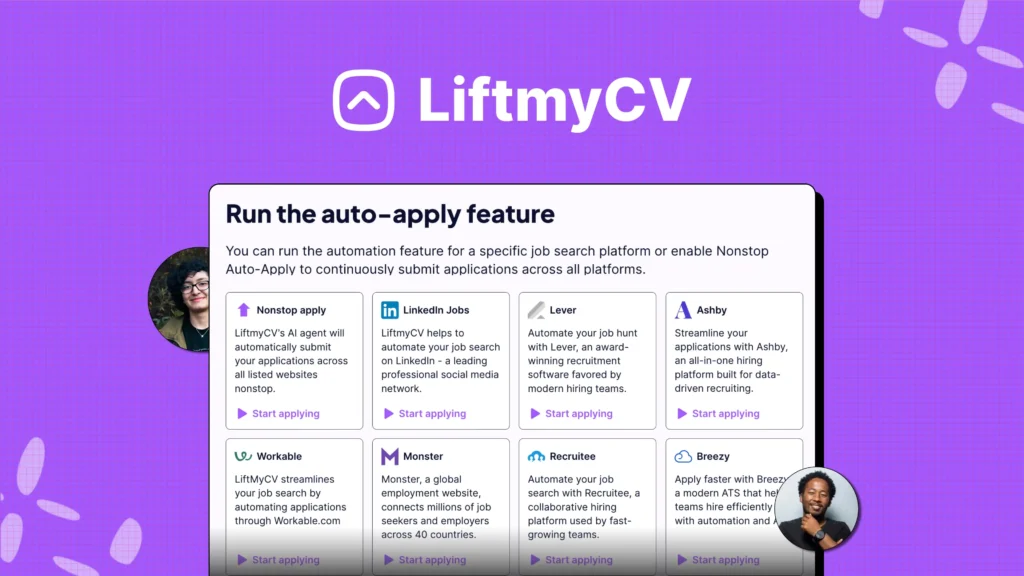
LiftmyCV’s AI scanner analyzes your CV, aligning them with the latest job market trends and ATS (Applicant Tracking System) requirements. It not only evaluates your documents but also adapts them to meet ATS standards, significantly improving your visibility to recruiters. By optimizing your application for ATS compatibility, LiftmyCV helps boost your conversion rate and increases your chances of landing more interviews.
Key LiftmyCV Auto-Apply Features:
- AI-Powered Job Search Assistant: Matches your skills and experience with the most relevant openings available.
- ATS-Optimized Profile Builder: Creates professional profiles tailored to meet ATS standards and increase recruiter visibility.
- Real-Time ATS Compatibility Scoring: Reviews your resume and LinkedIn profile, offering actionable tips to enhance your chances of getting noticed.
- Platform Integration: Connects seamlessly with top job sites like LinkedIn Jobs, Lever, Monster, Breezy HR, Recruitee, Ashby, and Workable for streamlined applications.
- Smart AI Autofill: Automatically fills out job applications using ATS-friendly formats to save you time and effort.
- Custom Auto-Apply Settings: Easily control how many applications are sent per day through a user-friendly Chrome extension.
- Application Tracking Dashboard: Monitor your auto-apply history, track application statuses, and stay organized throughout your job hunt.
- Flexible Payment Options: Choose a monthly subscription or a pay-as-you-go plan to fit your application volume and budget needs.
Available Submission Plans:
| Plan | CV submission | Cost | Model |
|---|---|---|---|
| Subscription | 50 AI Auto-Applies /mo | $4.99 | Subscription |
| 500 Lifts | 500 AI Auto-Applies | $14.99 | Pay-as-you-go |
| 1000 Lifts | 1000 AI Auto-Applies | $24.99 | Pay-as-you-go |
| 2000 Lifts | 2,000 AI Auto-Applies | $39.99 | Pay-as-you-go |
Additionally, LiftmyCV allows you to refine your job search using filters for job title, location, and preferred work setting (remote, hybrid, or on-site). Each application is submitted with consistent, ATS-optimized formatting, increasing your visibility across multiple platforms and boosting your chances of securing interviews – all while making the process far less overwhelming.
Try LiftmyCV for free – no subscription required!
Conclusion
Real-time tools can help fine-tune your LinkedIn profile, making it more appealing to recruiters and increasing your chances of landing interviews.
Key Takeaways
Effectively using feedback is crucial to improving your profile. Here are some areas to focus on:
| Focus Area | Benefit | Suggested Actions |
|---|---|---|
| Keyword Updates | Boosts visibility in ATS systems | Use AI-recommended keywords and formatting |
| Recruiter Appeal | Enhances response rates from hiring managers | Showcase measurable achievements and core skills |
| Profile Score | Tracks improvement over time | Adjust based on performance metrics |
These areas have a significant impact on how your profile performs, while LiftmyCV’s tools are designed to simplify the application process and elevate your success rate to the next level.
By focusing on ATS-friendly content and recruiter-preferred layouts, you can enhance your profile’s performance across various job platforms.


Read Next

LinkedIn Profile Optimization 2026: The Ultimate Guide to Getting Noticed by Recruiters and AI
Master your 30-second pitch. Our 2026 guide shows how to optimize your profile to land interviews 3x faster. Data-backed by LiftmyCV.
LinkedIn Easy Apply Limits and the Real Ban Risk
The LinkedIn Easy Apply limit, how many jobs you can apply to per day, whether LinkedIn automation is safe, and what really gets accounts flagged.

How to Build Your Network with AI – Job Search Strategies 2025
Unlock AI-powered networking strategies for your 2025 job search. Optimize your LinkedIn and grow your career connections faster.