
LinkedIn Easy Apply Limits and the Real Ban Risk
The LinkedIn Easy Apply limit, how many jobs you can apply to per day, whether LinkedIn automation is safe, and what really gets accounts flagged.
If you’ve looked for a job on LinkedIn recently, you know the drill: that first hit of excitement as you spot a handful of perfect openings, followed quickly by fatigue as you realize just how repetitive – and, frankly, thankless – the process can be. By the tenth “Easy Apply” click, many job seekers admit it’s hard to tell one role from another. I’ve been there myself – and, judging by endless Reddit threads and conversations with recruiters, so has nearly everyone else.
Don’t have time to read? Listen to the podcast instead:
You’re not alone. Pew Research Center found that more than half of US job seekers now call the online job search “exhausting,” with 51% saying it’s harder to get noticed than it was just a few years ago. Recruiters echo the same frustration: “The flood of generic, copy-pasted applications makes it nearly impossible to spot real talent,” says Lauren Kim, a senior recruiter at a major SaaS firm. The result? Great candidates are lost in a sea of spam, while job seekers feel invisible.
And here’s the irony: the very automation tools that promise to help often make things worse. Mass-blast bots and browser extensions can send hundreds of applications a day, but usually at the expense of your reputation – and, as we’ll see, can quietly damage your LinkedIn visibility or even get you soft-banned.
But there’s a better way: a new generation of AI-powered job search agents – like LiftmyCV – that help you auto-apply safely, strategically, and with a personal touch. This guide will show you how to use AI to automate your LinkedIn job search without spamming recruiters, damaging your profile, or getting flagged by algorithms.
In this article, you’ll learn:
- The real reason LinkedIn job search feels so broken in 2025
- Why most automation tools backfire (and how LinkedIn quietly flags spam)
- The difference between “bots” and real AI agents
- How to set smart filters, daily limits, and customize every application
- What features to look for (and what to avoid) in an auto-apply tool
- Why LiftmyCV leads the pack for safe, human, and effective job search automation
- A checklist for setting up your own smart AI-powered application workflow
- Real-world stories and tips from recruiters and successful job seekers
Ready to save time, boost your response rates, and finally make job search automation work for you – not against you? Let’s dive in.
Why LinkedIn Job Search Feels Broken for Everyone

t’s no secret: LinkedIn is the world’s go-to job platform, but for many candidates and recruiters, it can feel more discouraging than empowering. Candidates describe the routine: hours spent clicking “Easy Apply,” filling out repetitive forms, and hearing little or nothing back. Recruiters, meanwhile, are buried in a sea of applications – many of them generic or off-target.
Personal story:
“I sent out nearly 100 applications in a month and heard back from just three companies. It started to feel like I was sending my resume into the void,” says Omar, a recent grad from Barcelona.
His story is echoed across professional communities and job boards like Glassdoor and Indeed, where users report feeling lost and discouraged by a lack of real feedback.
What’s causing the breakdown?
Application overload: With “one-click” tools and more remote jobs than ever, recruiters receive hundreds of applications per role, often within hours. A 2025 SHRM report found that 68% of hiring managers now rely on automated filters to manage the volume.
Algorithmic walls: Most resumes are screened by ATS software before a human ever sees them, often filtering out strong candidates due to missing keywords or formatting issues.
Generic automation: Spammy bots and mass-blast scripts mean recruiters see identical cover letters and CVs, making it harder than ever for genuine talent to break through.
Expert insight:
“As a recruiter, I’m looking for signals of genuine effort,” shares Priya Malik, People Operations Lead at a leading European SaaS company, in an interview with The Muse. “But with so much automation, most applications blur together. Personalization stands out.”
The bottom line:
Both job seekers and recruiters are frustrated. It’s clear the old ‘more is better’ approach is broken. The solution? Smarter automation – where every application is relevant, personalized, and tracked instead of blasted into the void.
Why Job Seekers Are Turning to Automation
The job market in 2025 moves faster than ever. There are more applicants for every open role, and platforms like LinkedIn, Monster, and Workable rely heavily on algorithms and recruiter filters to sort through thousands of candidates. It’s no longer just about impressing a human – your application must first make it past the robots.
That changed how people look for work. “You’re not applying to companies anymore – you’re applying through platforms and AI-driven systems that value speed and relevance,” says Kevin Murray, a career advisor and former tech recruiter.
For many job seekers, manually applying to dozens of jobs per week just isn’t sustainable. It’s time-consuming, repetitive, and prone to mistakes – misspelling a name, attaching the wrong resume, or even reapplying to the same role twice.
It’s no wonder that automation tools have exploded in popularity. Platforms like LiftmyCV were created to solve exactly this problem: saving time, reducing stress, and improving the quality of every application. But not all automation is equal. Some tools focus only on speed, sending out hundreds of identical resumes and cover letters – a move that can backfire with both recruiters and platform algorithms.
What “Auto-Applying” Really Means – and Why Most People Get It Wrong
There’s a lot of confusion around the phrase “auto-apply” – and it’s easy to see why. For some, it means setting up a bot or browser script that fires off their resume to hundreds of jobs, hoping something sticks. For others, it’s about using AI to make the job search less tedious, but not less thoughtful.
Here’s the catch: recruiters can spot a mass-blast application in seconds. “When I see ten resumes come in from the same person in five minutes, all with the same cover letter, it’s an instant red flag,” says Priya Singh, a talent lead at a US-based startup. “We want candidates who actually read the job description and show some effort – even if they’re using automation.”
Most of the frustration around job search tech comes down to this misunderstanding. Tools that promise “auto-apply” are everywhere – but very few explain how they actually work, and fewer still warn you about the risks.
- Some “auto-apply” tools blindly submit generic resumes and cover letters.
- Others (like LiftmyCV) act as an AI agent, actually reading the job description, matching your skills, generating a custom cover letter, and letting you review or edit each application if you choose.
The difference is everything.
The first approach can get you flagged or ignored. The second helps you stand out and stay safe – even as you scale your applications.
Personal story:
After weeks of using a “spray-and-pray” auto-apply Chrome extension, Tomas, a data analyst in Warsaw, noticed his application views and recruiter messages drop to zero. When he switched to LiftmyCV, using Copilot mode to review and tailor each application, his response rate jumped. “It was the first time I felt like I had real control over my search – and recruiters actually noticed the effort,” he says.
The LinkedIn Easy Apply Limit
LinkedIn does not publish a hard number, and the throttle it applies is behavioural rather than a fixed quota. In practice people report the LinkedIn Easy Apply limit landing somewhere around a hundred applications in a day before submissions start failing, and the ceiling drops for new accounts with thin profiles. Ask how many jobs you can apply on LinkedIn per day and the number that matters is lower: fewer than the point where you stop reading the postings.
When LinkedIn Easy Apply is not working, the cause is usually one of three things: you have tripped the daily throttle, the posting routes to an external applicant tracking system that failed to load, or your profile is missing a field the employer marked required. Waiting a day resolves the first. The other two need you, not a tool.
Is LinkedIn Automation Safe?
It’s easy to believe that sending more applications will increase your chances – but on LinkedIn, “more” can quickly become “less.” Many job seekers make the mistake of trusting automation tools that focus on speed instead of quality, not realizing that these shortcuts may quietly work against them.
LinkedIn’s algorithm, though not fully public, is designed to reward authentic, human activity. Sudden bursts of job applications, repetitive messaging, and clicking “Easy Apply” on dozens of listings in minutes are all red flags. These actions can trigger hidden penalties – your profile gets shown to fewer recruiters, your applications drop in priority, and your job feed becomes less relevant. You may not even realize it’s happening, but your visibility is quietly dialed down.
Expert insight:
“LinkedIn doesn’t have to block you to keep you invisible,” explains James Ng, Senior Recruiter at a SaaS startup. “If your profile starts acting like a bot, you’ll just notice fewer profile views and less engagement. That’s LinkedIn’s way of protecting the platform – and recruiters appreciate it.”
But the algorithm isn’t the only thing you need to worry about. Recruiters themselves can easily spot when applications are automated and low-effort. If the bigger worry is your account, we break down whether it is safe to auto-apply to jobs. Imagine a hiring manager sifting through 200 applications in one afternoon. If a batch of them looks identical – same cover letter, no reference to the company, no unique insight – they’re instantly filtered out, often without a second look.
Worse, if your application lands in the “spam” pile, you might never recover your reputation for that company or recruiter. A single mistake, like applying to unrelated jobs with a generic message, can cost you future opportunities you’d actually be perfect for.
Real-world cost:
One candidate shared, “After using a popular mass-apply browser extension, I noticed I stopped getting recruiter messages for weeks – even though I was applying to more jobs than ever. It turns out, I was invisible. Only after I switched to a tool that let me personalize each application and slow down my pace did my profile start getting noticed again.”
The hidden cost of bad automation is lost opportunity.
The jobs you want most are often the ones where a little extra effort pays off. If your application is buried under a pile of identical, low-effort submissions, you might never get the chance to show what makes you unique.
LinkedIn Ban for Automation: What Actually Gets Flagged
If you’ve ever been tempted by browser extensions or “one-click” bots that promise to blast your resume to hundreds of jobs, you’re not alone. Sites like Reddit, Glassdoor, and even LinkedIn groups are filled with stories about desperate job seekers using every tool they can find to break through the noise. But here’s what most don’t realize: not all automation is created equal – and some can do far more harm than good.
A recruiter’s perspective:
“Whenever I see the same generic cover letter arrive ten times in five minutes, I don’t just ignore it – I actually block the sender and make a note to the team,” says Jennifer Ellis, a senior recruiter at a fintech startup in Berlin. “LinkedIn is smarter than people think. If you use bots, your profile can get flagged, and your applications drop off the radar.”
And this isn’t just recruiter bias. LinkedIn’s own documentation warns that using unauthorized third-party automation tools can lead to restrictions, shadowbans, or account suspensions (LinkedIn Help: Automation Tools Policy). It’s easy to see why: mass-blast bots and browser scripts rarely read job descriptions, personalize applications, or let you track what you’ve sent and where.
Real-world example:
Consider Mark, a marketing manager in London, who tried a well-known mass-blast extension (think: LazyApply or similar) and fired off 300 applications in a week. “I thought, at least I’ll get seen,” he says. “But within days, my LinkedIn profile views tanked. I even stopped getting recruiter messages on jobs I was qualified for. It felt like being invisible.” Mark switched to LiftmyCV, which let him review and personalize each application. Within two weeks, he landed three interviews and got real feedback for the first time in months.
So what makes “intelligent AI agents” like LiftmyCV different from spam bots and custom scripts?
Let’s break it down:
Table: Auto-Apply Tools Compared (2026)
| Feature / Risk | Intelligent AI Agent (LiftmyCV) | Spam Bots (e.g., LazyApply) | Custom Scripts |
| Reads job description & matches | Yes | No | Rarely |
| Customizes every application | Yes (AI-written per job) | No (generic for all) | Only if manually scripted |
| Cover letter quality | Human-like, ATS-ready, unique | Low, often copy-paste | Usually generic |
| User control (review/edit) | Full control (Autopilot/Copilot) | No (blind submission) | Only if coded in |
| Risk of LinkedIn ban/shadowban | Very low (human pacing, safety) | High | High (esp. with fast scripts) |
| Application tracking/history | Yes (dashboard, exportable) | Sometimes, often basic | Rarely |
| Built-in filters & limits | Yes | Usually no | No |
| Supported job boards | Multi-platform, always updated | Varies (usually limited) | Custom only (needs upkeep) |
| Recruiter response rate | High (personalized, relevant) | Very low (marked as spam) | Very low |
Sources: Recruiter interviews, LinkedIn Automation Policy, user case studies
Key takeaway:
Spammy bots and scripts put your LinkedIn account at risk, and they rarely deliver real results anyway. Intelligent AI agents like LiftmyCV automate the busywork without sacrificing personalization, safety, or control – so you can apply at scale, but still make every application count.
How Smart AI Tools Automate LinkedIn Job Applications – the Right Way
With all the noise around “AI” and automation, it’s easy to miss what actually works. The best AI job search agents don’t just fire off resumes in bulk – they help you apply quickly and thoughtfully, balancing efficiency with a personal touch.
Here’s how a smart AI tool like LiftmyCV is different:
It actually reads job descriptions.
The software uses advanced language models to analyze each job listing, extracting the requirements, responsibilities, and skills that matter most. That means your application is matched to the role, not just a random title or keyword.
It personalizes every application – at scale.
Instead of using the same copy-paste cover letter, LiftmyCV generates a unique, human-sounding letter for each job. It references company names, aligns your experience with the posting, and always passes ATS (Applicant Tracking System) scans. You can review, edit, or skip any application you want.
It gives you control over the process.
Whether you want to “set and forget” with Autopilot or manually approve each application in Copilot mode, LiftmyCV fits your workflow. You can set daily limits, exclude certain companies, and focus only on the roles you actually want.
It keeps a transparent record.
Every application is logged in a dashboard with submission dates, links, and status – so you never lose track or apply twice by accident.
Expert perspective:
“Smart AI agents should feel like an assistant, not a robot,” says Sophie Demir, a talent acquisition specialist at a global tech consultancy. “The best tools help candidates present their best selves – without cutting corners or putting their profiles at risk.”
Real user story:
Rahul, a data scientist in Amsterdam, tried three auto-apply tools before finding LiftmyCV. “The other platforms just sent my resume everywhere, and I got zero responses. With LiftmyCV, I could tweak each application and see which roles were actually a fit. I ended up getting more interviews in two weeks than I had in the previous two months.”
Key insight:
The right AI job search agent doesn’t just save time – it makes you look better. It’s the difference between being lost in the spam folder and getting noticed for who you really are.
Smart Auto-Apply in Action: How LiftmyCV Stands Out
While many automation tools promise speed, few manage to combine it with precision. LiftmyCV’s LinkedIn Auto-Apply system takes a different approach, built to help you automate your LinkedIn job search without sacrificing relevance, control, or your professional reputation.
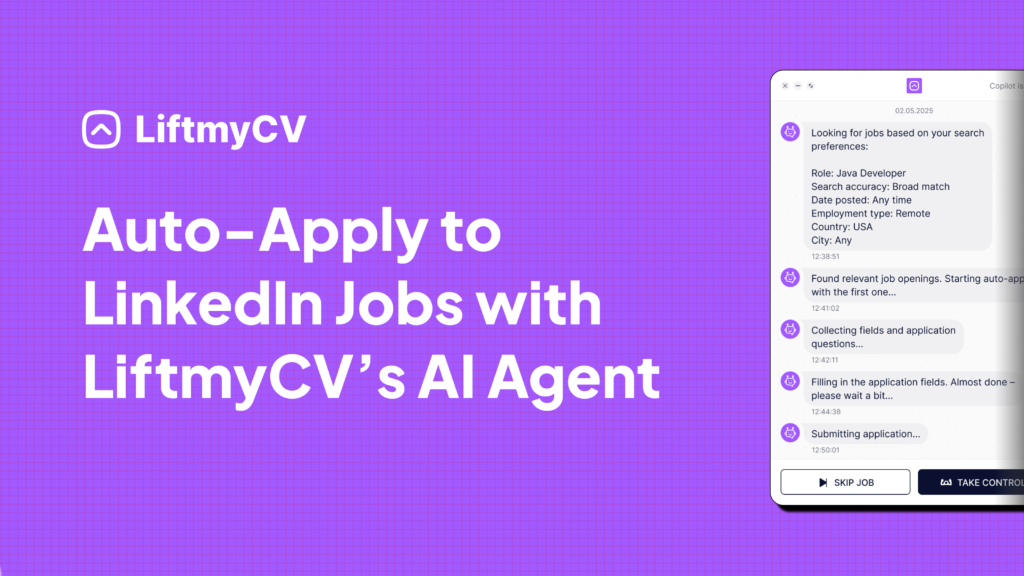
Here’s how it works differently from traditional “click-and-pray” bots:
Personalized Applications, Every Time
Instead of sending the same message to everyone, LiftmyCV generates a unique, AI-written cover letter for each job – directly based on the job description. These letters are tailored, structured, and ATS-friendly, helping your applications stand out in high-volume pipelines.
Custom Filters + Smart Matching
You stay in control by setting your own search filters – job title, location, visa needs, work type, and more. LiftmyCV doesn’t guess. It applies only to the jobs that match your criteria, using LinkedIn’s native job search and your saved preferences.
Autofill That Goes Beyond “Easy Apply”
Many job listings include extra questions:
“Why do you want this job?”
“What’s your availability?”
LiftmyCV reads those prompts and uses AI to autofill them with contextual, human-sounding answers, reducing the need to manually rewrite every field.
Autopilot or Copilot – You Choose
Prefer to review each job before applying? Use Copilot mode.
Want to apply hands-free while focusing on other tasks? Autopilot has you covered. Either way, you set the daily limits, pacing, and platforms.
Full Application Tracking
Every submission is logged:
- Which platform it went to
- What filters were used
- Resume/cover letter versions
- Timestamps and job links
No more guesswork or repeated applications. Just clean data and full visibility.
LiftmyCV brings together automation, personalization, and control – giving you the power to apply faster, without getting flagged or ignored.
Quick-Start Checklist for Safe LinkedIn Automation
It’s never been easier – or riskier – to automate your job search. But with the right approach, you can use AI to save hours each week and actually improve your chances of getting hired. Here’s a quick-start checklist for automating your LinkedIn job hunt safely, efficiently, and without spamming recruiters.
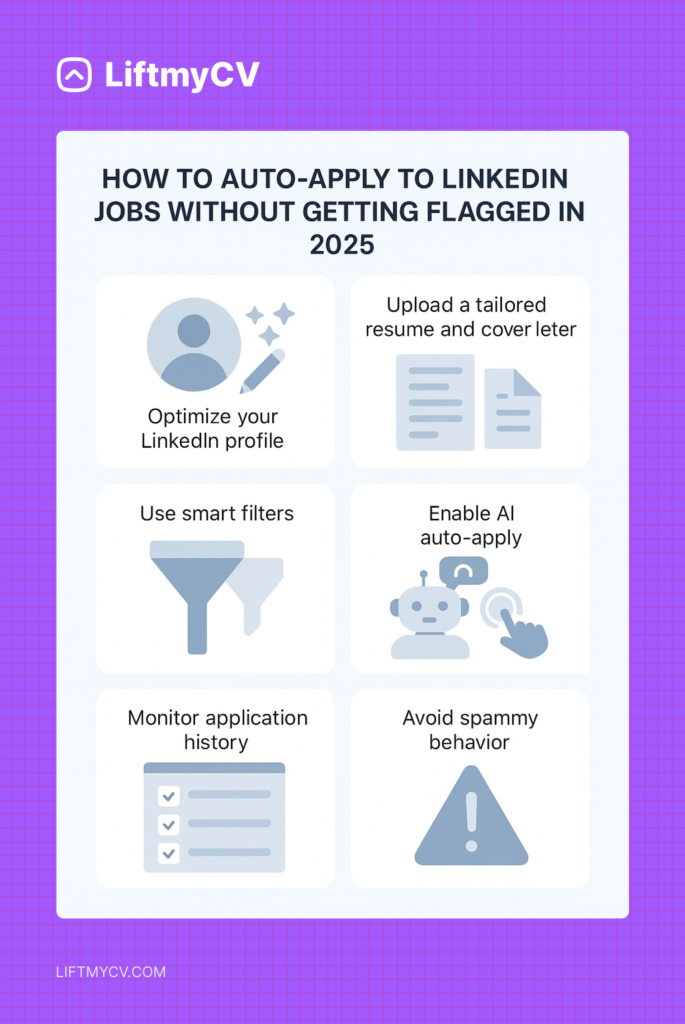
Here’s a step-by-step checklist to set up your LinkedIn auto-apply process the smart way.
1. Prepare Your LinkedIn Profile
Before you automate anything, make sure your profile is optimized:
- Use a clear headline that includes your role and key strengths
- Add recent work experience with bullet points and measurable results
- Update your skills list – include tools, certifications, and role-specific terms
- Set “Open to Work” preferences for recruiters (and make them private if needed)
- Make sure your profile picture and About section reflect your current goals
2. Choose a Tool That Does More Than Click
Look for an automation platform that goes beyond mass apply. You’ll want:
- Per-job resume and cover letter generation
- Filters for role, location, and visa preferences
- Smart form autofill, including open-ended questions
- Application pacing and daily limits
- Tracking dashboard to view where, when, and what you’ve submitted
This is where tools like LiftmyCV stand out – helping you scale intelligently, not recklessly.
3. Set Your Filters and Daily Limits
To protect your account and improve response rates, use narrow filters:
- Job title variations (e.g. “Content Designer,” “UX Writer”)
- Target location or remote/hybrid options
- Work authorization or visa sponsorship (if needed)
- Daily max (e.g. 15-25 jobs)
- Time delay between applications (1-3 minutes)
Fewer, better applications always win over mass volume.
4. Track, Measure, Improve
Don’t “set it and forget it.” Review your application history weekly:
- Which types of jobs generated views or interviews?
- Which cover letter styles got better responses?
- Were some platforms more effective than others?
Use this data to adjust your filters, resume content, and timing – small tweaks can unlock major improvements.
5. Follow Up Where It Counts
If you see a recruiter has viewed your profile or you’ve made it past the initial screen – follow up with a short, polite message. Automation brings you to the door, but human connection gets you through it.
Quick Reference Table: Responsible AI Auto-Apply Workflow
| Step | What to Do | Why It Matters |
| Update your LinkedIn profile | Polish headline, summary, experience, photo | First impression counts |
| Use a smart AI tool | LiftmyCV or similar – never mass-blast bots | Safe, personalized, effective |
| Set filters & daily limits | Target only relevant jobs, max 10-20 per day | Avoids spam flags, burnout |
| Review each application | Edit/tweak using Copilot mode | Maximizes personalization |
| Track and follow up | Use dashboard & send personal notes | Boosts response rates |
Ready to Try Smarter Auto-Apply?
LiftmyCV helps you automate your LinkedIn job search without compromising on quality. With personalized cover letters per job, AI autofill, full tracking, and smart filters – you stay in control while saving hours each week.
Start for free – no credit card required. Explore your next job opportunity with LiftmyCV, and let AI handle the busywork.


FAQ
How many jobs can you apply to on LinkedIn per day?
There is no published cap. Submissions start failing somewhere near a hundred in a day for established accounts, and sooner for new ones. Volume is not the constraint that matters anyway: relevance is what decides whether any of them get read.
Can I really automate job applications on LinkedIn without getting banned?
Yes – but only if you use tools that apply gradually, match relevant roles, and generate custom responses. Avoid bots that mass-submit generic applications.
What’s the difference between “Easy Apply” and AI auto-apply tools?
“Easy Apply” is a manual LinkedIn feature. AI tools like LiftmyCV auto-fill forms, generate per-job cover letters, and apply based on your filters – with no manual effort.
Will recruiters notice if my application was AI-generated?
They will if it’s generic. Smart tools personalize each message to match the role and tone, making your application feel human and intentional.
How many jobs should I apply to per day with automation?
10-25 is a safe range. Tools like LiftmyCV allow you to set daily limits and delays to keep your behavior natural and avoid platform flags.
Does LiftmyCV support other job boards besides LinkedIn?
Yes, it also works with Monster, Lever, Workable, Recruitee, Breezy, and others – with support for custom filters and multi-platform tracking.
Read Next

LinkedIn Profile Optimization 2026: The Ultimate Guide to Getting Noticed by Recruiters and AI
Master your 30-second pitch. Our 2026 guide shows how to optimize your profile to land interviews 3x faster. Data-backed by LiftmyCV.
Simplify Jobs Review: The Chrome Extension, Pricing & Alternatives
A Simplify Jobs review of the Chrome extension, pricing, and how it works, plus the best Simplify alternative that adds hands-off auto-apply to AI job matching.
AIApply Review: Pricing, Features & the Best Alternative
An AIApply review covering pricing, features, and whether it is worth it, plus the best AIApply alternative for hands-off, high-volume auto-applying.