
AI Tools for Job Seekers: How to Use AI in Your Job Search
The best AI tools for job hunting, what an AI job search assistant really does, and how to use AI in your job search without wasting hours.
AI tools for job seekers do three things well: they cut the repetitive work, they shape your resume for the applicant tracking system, and they surface roles that match your skills. Everything else marketed as an AI job search assistant is a variation on those three. Here is how to use AI in your job search, and where it still needs you.
- Save Time: Automate job applications and focus on networking and interviews.
- Optimize Your Resume: Use AI to match your resume with job descriptions and improve ATS compatibility.
- Find Better Matches: AI filters and recommends jobs based on your preferences and skills.
- Track Applications: Stay organized with tools that monitor your application status and responses.
Quick Steps to Start:
- Upload your resume to an AI tool like LiftmyCV.
- Set job preferences (role, location, salary).
- Enable auto-apply to submit applications automatically.
- Use AI suggestions to refine your resume and job search.
AI tools can handle the tedious parts of job hunting, so you can focus on what matters – personalizing your applications and preparing for interviews.
The Best AI Tools for Job Hunting, by Job
What an AI Job Search Assistant Handles
AI is changing the way people apply for jobs by handling repetitive tasks and simplifying the process. Here’s how you can use these tools effectively:
Getting Started with LiftmyCV
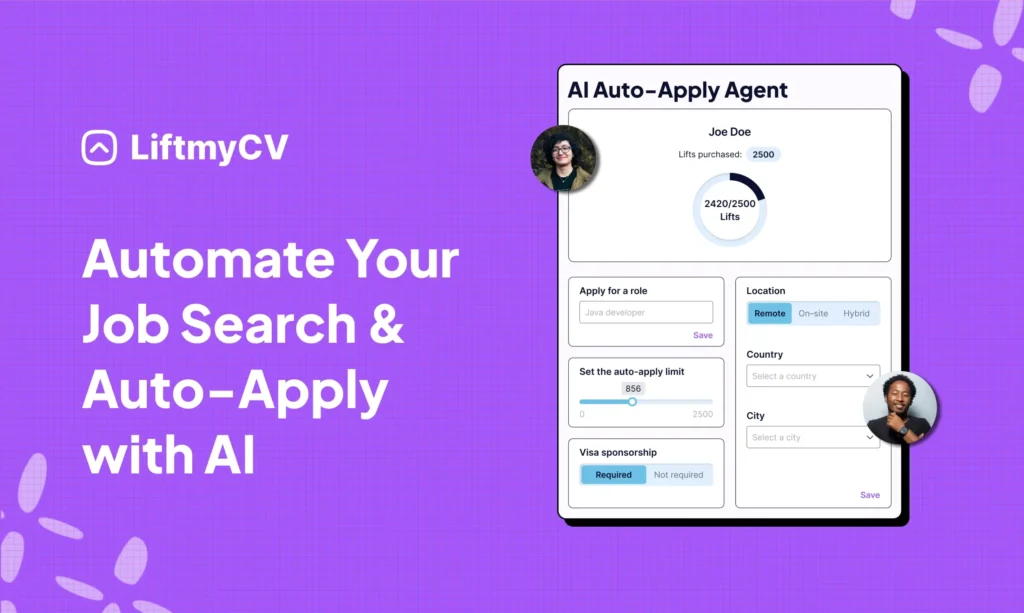
LiftmyCV offers an AI-driven platform that simplifies job applications using its Chrome extension and dashboard. Key features include:
| Feature | What It Does |
|---|---|
| Profile Scanner | Analyzes your resume and profile to improve applications |
| Multi-Platform Support | Compatible with LinkedIn Jobs, Lever, Workable, Monster |
| Tracking | Keeps tabs on application statuses and auto-responses |
| Custom Filters | Lets you focus on specific roles, locations, and job types |
To get started, upload your resume to the dashboard and pin the Chrome extension for easy access. Then, set up your auto-apply preferences to let the system handle applications for you.
Setting Up Auto-Apply Features
Follow these steps to configure the auto-apply feature:
- Set Job Preferences: Choose filters for job roles, locations, and work arrangements that match your goals.
- Define Application Limits: Decide how many applications you want to send daily. LiftmyCV offers these plans:
| Plan | CV submission | Cost | Model |
|---|---|---|---|
| Subscription | 50 AI Auto-Applies /mo | $4.99 | Subscription |
| 500 Lifts | 500 AI Auto-Applies | $14.99 | Pay-as-you-go |
| 1000 Lifts | 1000 AI Auto-Applies | $24.99 | Pay-as-you-go |
| 2000 Lifts | 2,000 AI Auto-Applies | $39.99 | Pay-as-you-go |
- Enable AI Auto-Apply: Turn on the AI auto-apply feature. The tool will search for and apply to relevant positions across supported job boards automatically.
“LiftmyCV makes your job search painless with its innovative AI-powered auto-apply job search agent.” – LiftmyCV
Summarizing, sing AI to find a job is changing the game for job seekers, making the process faster, smarter, and more efficient. Instead of manually sifting through job boards and sending countless applications on platforms like LinkedIn, AI-driven tools like LiftmyCV offer a better way. Powered by ChatGPT-4o, LiftmyCV helps you use AI to optimize your profile for ATS systems and automate your applications – saving you time, reducing stress, and increasing your chances of landing the right role.
What LiftmyCV Offers for Job Seekers:
- AI Job Search Assistant: Matches your skills and experience with tailored job opportunities across leading platforms.
- ATS-Friendly Profile Builder: Creates professional, ATS-optimized profiles to enhance your visibility with recruiters.
- Real-Time ATS Scoring: Analyzes your resume and provides instant tips to boost your chances of passing ATS filters.
- Smooth Platform Integration: Connects to top job sites like LinkedIn Jobs, Monster, Lever, Breezy HR, Recruitee, Ashby, Workable, and more.
- AI-Powered Autofill: Automatically fills out job applications with polished, ATS-compliant details to speed up the process.
- Customizable Auto-Apply Settings: Control how many applications are submitted daily through a user-friendly Chrome extension.
- Application Management Dashboard: Keep track of your submissions and monitor application progress in a single, easy-to-use dashboard.
- Flexible Pricing Options: Whether you prefer a subscription or a pay-as-you-go plan, LiftmyCV offers pricing that fits your budget.
Getting Your Resume Past the Screener
Getting your resume past an ATS (Applicant Tracking System) is the first step to landing interviews. AI tools can significantly improve your chances by fine-tuning your resume for ATS requirements.
Using AI Resume Tools
AI-driven resume builder tailors your resume to match job descriptions. It identifies key terms and suggests where to place them for maximum impact. Here’s how it works:
| Resume Section | AI Features |
|---|---|
| Profile Summary | Analyzes keyword frequency and suggests industry-specific terms |
| Skills Section | Matches your skills to job requirements automatically |
| Work Experience | Creates bullet points focused on achievements and relevant keywords |
| Education | Formats credentials and certifications clearly |
The tool evaluates your resume against job descriptions, providing a match score and actionable recommendations for improvement.
Beyond keyword optimization, proper formatting ensures your resume smoothly navigates ATS filters.
ATS Resume Formatting Tips
An ATS-friendly resume isn’t just about what you say – it’s about how you present it. Correct formatting has a direct impact on how often your resume gets seen and shortlisted. To maximize your success rate, make sure you follow these key guidelines:
- Document Structure: It organizes your resume with standard headings like “Work Experience”, “Education”, and “Skills”, making it easier for ATS to categorize your details.
- File Format: The AI saves your resume in ATS-compatible formats:
- Preferred: .docx for the best compatibility
- Optional: .pdf only if requested
- Avoid: Image files like .jpg or .png
- Design Elements: To keep formatting clean, it uses:
- Standard fonts like Arial or Times New Roman
- No tables, headers, or footers
- Proper spacing between sections
Remember, even a well-written resume can get filtered out if the formatting isn’t ATS-compliant – so taking the time to get it right directly boosts your chances of getting noticed.
Letting AI Surface the Right Roles

AI helps identify roles that align with your skills and career goals. You can fine-tune your search using detailed filters and set up alerts to stay updated on new opportunities.
Setting Job Search Filters
LiftmyCV offers AI-driven filters to help you narrow down job options effectively. The platform reviews your profile and suggests filter combinations tailored to your preferences. Here’s a breakdown of the available filters:
| Filter Category | Custom Options |
|---|---|
| Location | Choose remote, hybrid, or on-site jobs within specific zip codes or a set radius |
| Industry | Select multiple sectors with suggestions from the AI |
| Experience Level | Options range from entry-level to executive, with salary matching included |
| Job Type | Options include full-time, contract, temporary, or internships |
| Posted Date | Filter by jobs posted in the last 24 hours, up to 30 days, with relevance scoring |
To make the most of these filters:
- Start Broad: Begin with basic criteria like location and job type.
- Refine Over Time: Let the AI learn from your interactions to improve its suggestions.
- Review Matches: Provide feedback on results to sharpen future recommendations.
Once you’ve set your filters, activate job alerts to stay informed about new openings.
Setting Up Job Alerts
Job alerts ensure you never miss a relevant posting. Here’s how to configure them:
- Choose Alert Frequency
- Instant updates
- Daily summaries
- Weekly overviews
- Set Match Criteria
- Skills alignment
- Experience level
- Salary fit
- Preferred locations
- Industry focus
- Personalize Notifications
- Receive updates via email
- Enable browser alerts
- Get mobile app notifications
Well-configured alerts help you catch relevant openings early – and the more you interact with them (by saving or applying for jobs), the better your future recommendations will match your interests.
Where AI Tools for Job Seekers Stop Helping
AI can cut the busywork, but manual effort still decides the outcome. The most effective strategy blends automated tools with personal networking. Here’s how to strike that balance for better results.
AI Tools and Networking
LiftmyCV’s AI features shine when paired with thoughtful networking. The platform helps pinpoint target companies and roles, allowing you to focus your networking where it counts.
| Activity Type | AI Support | Personal Touch |
|---|---|---|
| Company Research | Automated job matching | Attending industry events |
| Application Process | Resume optimization | Writing custom cover letters |
| Follow-up | Application tracking | Direct, personalized outreach |
| Skills Assessment | AI-based recommendations | Leveraging professional references |
This combination ensures your job search is both efficient and personal.
Managing Job Applications
Tracking system based on AI simplify the application process by keeping everything organized. It provides real-time updates and helps you time your follow-ups effectively.
Key features include:
- Application Dashboard: Keep track of submission dates, responses, and deadlines for follow-ups.
- Status Categories: Organize applications into categories like pending, interviewed, rejected, or accepted.
- Response Analytics: Monitor response rates to fine-tune your application strategy.
While these tools keep you organized, adding personal touches can set your applications apart.
Adding Personal Elements
AI can handle repetitive tasks, but personalizing your approach makes a big difference. Here are a few ways to add that human touch:
1. Tailored Cover Letters
Craft cover letters that highlight your unique experiences relevant to each role. Include specific insights about the company and express genuine enthusiasm for their mission.
2. Follow-up Strategy
Develop a clear plan for following up:
- Wait 5-7 business days after submitting an application.
- Send a short, personalized email referencing the role and your interest.
- Mention any new achievements or updates that strengthen your candidacy.
3. Interview Preparation
Blend AI insights with your own research to prepare thoroughly:
- Review job requirements identified by AI and research recent company updates.
- Prepare examples of how your experience aligns with the role.
- Practice answering common interview questions to feel confident.
This mix of automation and personal effort can make your job search more efficient and impactful.
Conclusion
Use AI tools to improve your job search, cut the busywork, and increase your chances of landing the right role. Here’s a breakdown of the main points to help you get started.
| Area | AI’s Role | Benefit |
|---|---|---|
| Resume Optimization | Formats resumes for ATS and adds keywords | Better chances of selection |
| Application Process | Automates submissions across platforms | More applications sent |
| Job Matching | Filters and suggests suitable roles | Finds better opportunities |
| Time Management | Tracks and organizes tasks automatically | Saves time and effort |
“Just be sure to review, tweak, and edit all content created with AI assistance to make sure it still reflects your voice. AI will help you with your first, not final draft.” – Catherine Fisher, LinkedIn career expert


FAQ
What are the best AI tools for job hunting?
The ones that cover a distinct step rather than all of them badly: a resume tailor that rewrites against the job description, a matcher that scores listings against your background, and an auto-apply tool that submits. Anything claiming to replace the interview is selling something.
What does an AI job search assistant actually do?
It reads job descriptions, compares them to your profile, rewrites your resume and cover letter for each posting, and submits the application. You still choose the targets and handle the conversations.
How do you use AI in a job search without sounding generic?
Treat the output as a first draft. Feed the tool your real numbers and specifics, then edit the result so it carries your voice. Recruiters spot unedited AI text quickly, and the tell is usually vague accomplishment language.
Read Next
Simplify Jobs Review: The Chrome Extension, Pricing & Alternatives
A Simplify Jobs review of the Chrome extension, pricing, and how it works, plus the best Simplify alternative that adds hands-off auto-apply to AI job matching.
AIApply Review: Pricing, Features & the Best Alternative
An AIApply review covering pricing, features, and whether it is worth it, plus the best AIApply alternative for hands-off, high-volume auto-applying.
How to Set Up Job Alerts on LinkedIn and Indeed
Hand the repetitive steps to software and reach far more employers. A step-by-step guide to automating your job search the smart way.