
Common AI Job Search Automation Mistakes to Avoid
Learn the most common AI job search automation mistakes that cost you interviews - and how to avoid them with smarter tools like LiftmyCV.
Automating your job search can save time, but over-relying on AI tools can hurt your chances. Here’s what you need to know:
- AI Bias: Automated systems can unintentionally discriminate, like ranking resumes unfairly based on names.
- Generic Resumes: One-size-fits-all resumes often fail ATS (Applicant Tracking Systems) filters.
- Mass Applications: Sending too many applications quickly can lower quality and trigger spam flags.
- Platform Errors: Incorrect settings or missing details on job platforms can lead to missed opportunities.
- Formatting Issues: Fancy layouts or inconsistent formats can confuse ATS, reducing your chances.
How to Avoid These Mistakes:
- Balance automation with manual review – customize resumes and double-check AI-generated applications.
- Use ATS-friendly formats (e.g., .docx, standard fonts) and include job-specific keywords.
- Limit daily applications to focus on quality over quantity.
- Optimize job platform settings, including profile visibility and search filters.
The Risks of Too Much Automation
The growing use of AI in job applications comes with potential downsides. While it offers convenience, relying too heavily on automation without proper human input can backfire. For example, 73% of US workers have considered using AI to enhance their resumes, and 45% admit to exaggerating details during job applications. Overusing AI tools might end up doing more harm than good for your job search.
Problems with Unmonitored Applications
Letting AI handle applications without oversight can lead to serious problems, including:
AI Bias: According to Bloomberg, AI systems can introduce biases during candidate evaluations. For instance, resumes with names commonly associated with Black Americans were ranked lower for financial analyst roles. This shows how unchecked AI systems can unintentionally perpetuate discrimination.
Quality Control: Emi Chiba from Gartner points out that many candidates now use AI-enhanced resumes. This widespread use makes it even more important to review and personalize applications to stand out.
These challenges highlight why human review is a critical part of the process.
Combining AI and Human Review
To improve your chances while reducing risks, balance automation with manual effort:
Set Limits on Applications: Don’t send out too many applications in a day. This allows time to review and refine each one.
Here are some tips to make the most of AI tools:
- Double-check every AI-generated application for accuracy.
- Tailor key sections, especially for roles you care about most.
- Track responses and adjust your approach as needed.
Here’s what job seekers are doing differently in 2025:
| Strategy | Implementation | Impact |
|---|---|---|
| Hybrid Approach | 50% AI assistance, 50% human review | Balances efficiency with accuracy |
| Platform-Specific | Tailored settings for each platform | Minimizes rejection rates |
| Daily Limits | 10-15 targeted applications | Preserves application quality |
| Format Control | ATS-friendly resume versions | Boosts parsing success |
ATS Resume Optimization Errors
Optimizing your resume for Applicant Tracking Systems (ATS) is a critical part of any AI-driven job search strategy. With 99.7% of recruiters relying on these systems to filter candidates, failing to tailor your resume can drastically hurt your chances of landing an interview.
Why One Resume Doesn’t Work
Relying on a single, generic resume for all your applications is a major misstep. Recruiters use ATS to filter resumes based on several criteria:
- 76.4% filter by skills
- 59.7% by education
- 55.3% by job title
- 50.6% by certifications
- 44.3% by years of experience
If your resume isn’t customized for the specific job, it’s likely missing critical keywords and requirements. Resume expert Bob McIntosh explains:
“When you apply to a great company with a generic resume that hasn’t been tailored to the role, you blow your chance to stand out.”
Customizing your resume for each role can help avoid these pitfalls.
Smart Resume Customization
To improve your chances with ATS, focus on these key strategies:
Format for ATS Compatibility
- Stick to standard fonts like Calibri, Arial, or Helvetica.
- Use clear headings such as “Work Experience”, “Education”, and “Skills.”
- Save your resume in ATS-friendly formats like .docx or PDF.
- Avoid using graphics, tables, or fancy formatting.
Keyword Optimization
Tailor your resume to include keywords from the job description. As Jazlyn Unbedacht, a Resume Writer & LinkedIn Optimization expert, advises:
“There is no more sure-fire way to get your resume lost in an ATS than to clutter your resume with graphics, tables, and creative fonts. You’ll want to, but don’t do it!”
Essential Technical Details
- Use consistent date formats, like “January 2021 – March 2023.”
- Spell out acronyms and include the full terms (e.g., “application programming interfaces (APIs)”).
- Incorporate both variations of key skills (e.g., “artificial intelligence (AI)”).
Finally, ensure your resume is error-free, as 77% of hiring managers will reject resumes with typos or grammatical mistakes. A well-tailored resume not only passes ATS filters but also makes a strong impression on hiring managers.
Job Platform Setup Mistakes
Setting up your job platform incorrectly can lead to missed opportunities. If your settings aren’t right, your applications might get overlooked or filtered out.
Platform Requirements Guide
Every job platform has its own rules and limitations. Ignoring these can hurt your chances of success. To avoid this, make sure you follow these basic steps:
- Fill out all required fields before turning on automation.
- Keep your contact details current.
- Set realistic salary ranges.
- Turn on job alerts.
- Double-check your email settings.
“You give up complete control of your job search. Instead of making thoughtful decisions about where and how to apply, you’re outsourcing that strategy to a machine that doesn’t know your goals, preferences, or values.”
By following these steps, you can improve your chances of getting noticed by potential employers.
Platform-Specific Settings
Fine-tuning your profile and search settings is key to standing out.
Profile Visibility Settings
- Mark your profile as “Open to Work.”
- Activate your status as an active job seeker.
- Adjust privacy settings to allow recruiter messages.
- Set up auto-response templates for inquiries.
Search Parameters
- Use specific job titles and their variations.
- Choose your preferred locations, including remote work options.
- Define the experience level you’re targeting.
- Apply salary range filters to match your expectations.
Essential Configuration Steps
- Check that your resume meets formatting guidelines.
- Set up job alerts using relevant keywords.
- Turn on notifications for application tracking.
- Enable two-factor authentication for security.
- Create email filters to organize responses to your applications.
Application Volume Problems
Submitting too many applications can hurt your chances of landing interviews. Beyond your chances, it can also put your account at risk, which we cover in our guide on safe auto-applying. Employers, on average, receive over 100 applications for each job opening, making it essential to stand out for the right reasons.
Effects of Mass Applications
Rushing through multiple applications in a short time can create several issues:
Lower Quality Applications
When you’re in a hurry, errors are more likely. A study revealed that 39% of employers see typos and grammar mistakes as the biggest deal breakers in communication.
Negative Perception by Recruiters
Hiring managers often view mass applications as unfocused. Julia Pollak, chief economist at ZipRecruiter, notes: “It appears you are indiscriminately applying without targeting the right fit”.
Algorithm Flags
Job platforms use advanced systems to monitor application patterns. Submitting too many applications quickly can trigger spam filters or reduce your visibility.
To avoid these pitfalls, focus on sending fewer, high-quality applications.
Setting Smart Application Limits
Balancing the number of applications with quality is key to improving your chances while avoiding platform penalties. Here’s how:
Daily Application Goals
Applying to 2-3 jobs per day has been shown to yield better outcomes. This approach allows you to:
- Review each application carefully
- Tailor your resume and cover letter
- Avoid careless mistakes
- Stay under spam detection thresholds
Focus on Timing
Data shows that 89% of successful applicants received responses within a week of applying. Prioritize:
- Jobs posted within the last 1-2 days
- Roles that match your skills and experience
- Active listings from companies currently hiring
Consistency in Quality
Adopt a systematic process to ensure every application meets high standards:
| Area | Best Practice | Benefit |
|---|---|---|
| Timing | Apply within 24-48 hours | Increased recruiter visibility |
| Keywords | Use role-specific keywords | Improved ATS compatibility |
| Grammar | Use editing tools | Fewer errors |
| Follow-up | Wait a week before moving on | Better time management |
Document Format Issues
Incorrect formatting is a major hurdle in automated job applications. Clear and consistent document formatting is essential to avoid common mistakes.
Resume Format Errors
Poor formatting can derail your application. Here are the key issues to avoid:
- Complex Layouts and Hidden Content: Tables, columns, graphics, and hidden elements like headers or footers can prevent ATS systems from reading important details.
- Font and Styling Problems: Using unusual fonts or excessive styling can interfere with how your resume is processed.
- Date Format Inconsistencies: Mixing different date formats can confuse the system and disrupt the timeline of your experience.
ATS-Ready Resume Guide
Once you’ve tailored your resume for ATS, ensure the format is optimized for smooth parsing.
Essential Format Requirements
| Element | Correct Format | Why It Matters |
|---|---|---|
| Font | Arial, Calibri, or Georgia (10-12pt) | Ensures the text is easily readable by ATS |
| Margins | One inch on all sides | Prevents important information from being cut off |
| Bullet Points | Standard black dots | Reduces the risk of parsing mistakes |
| File Type | .docx or PDF | Preserves formatting across systems |
Section Naming Conventions
Stick to standard section headers for clarity:
- Work Experience
- Education
- Skills
- Contact Information
Keyword Integration
Include both acronyms and their spelled-out forms (e.g., application programming interfaces (APIs)) to ensure the system captures relevant terms.
Professional Proofreading
Typos and grammar mistakes can cost you the job – 77% of hiring managers reject resumes with errors. Carefully review your resume or use editing tools to ensure it’s error-free.
Optimizing your resume for ATS isn’t about gaming the system. It’s about presenting your qualifications in a clear, consistent way that both ATS software and recruiters can easily understand.
How LiftmyCV Makes Job Search Automation Smarter
Most job search tools promise automation – few help you actually improve your chances. That’s where LiftmyCV stands out. It’s not just an auto-apply bot – it’s a smart job search assistant that adapts to how real hiring works.
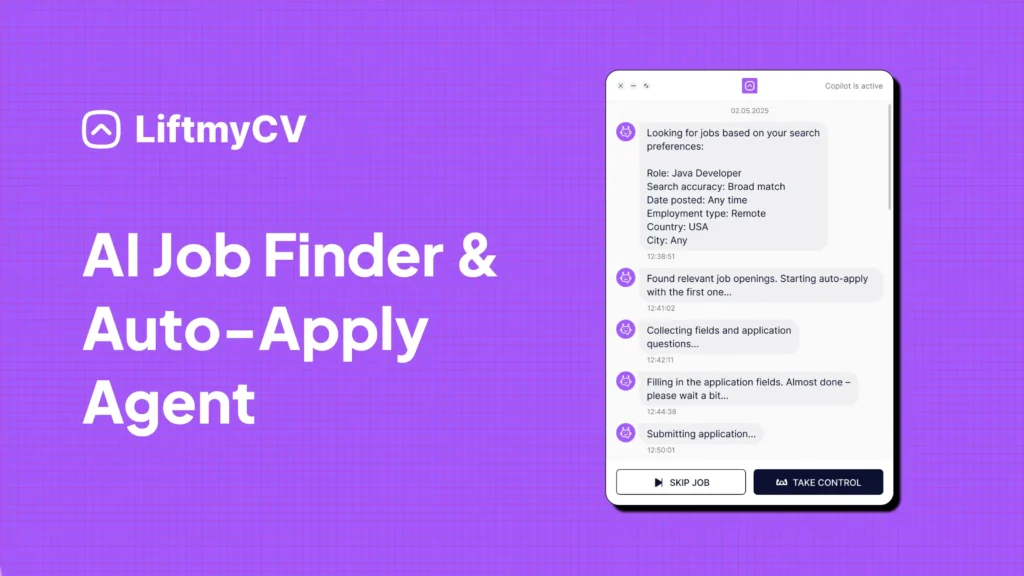
LiftmyCV helps you avoid the most common mistakes by:
- Tailoring each letter to the job before submitting
- Tracking every application you send, across 7 major platforms
- Scoring your job seeker profile’s match with AI, so you can fix it before you apply
- Giving you control: switch between Autopilot and Copilot modes any time
You get speed, structure, and better results – without the spammy tactics or guesswork.
Try LiftmyCV free today – no credit card required.
BONUS VIDEO: What a Flood of Bot Applicants Means for Job Seekers
Conclusion: Automate Smarter, Not Harder
Automation can save hours in your job search – or ruin your chances if used carelessly. Sending out 100 generic applications won’t help if your resume isn’t relevant, your applications aren’t tracked, and recruiters never see your best version.
The tools you use – and how you use them – make all the difference.
That’s why LiftmyCV is built for real-world results. It combines smart AI with human-level control: match scoring, personalized job seeker profiles & cover letters, clean tracking, and application delivery that works across trusted platforms – not against them.
If you’re ready to stop guessing and start landing real interviews, give LiftmyCV a try.
Fast, focused, and free to start.
Achieving success with job search automation means combining the efficiency of AI with the judgment of human oversight. If you are setting this up for the first time, our guide on how to automate your job search walks through the right order. Focusing on targeted, high-quality applications often leads to better outcomes than simply applying to as many jobs as possible. Research shows that targeted applications consistently outperform mass submissions. The strategies below outline how to strike this balance effectively.


FAQ
Does using auto-apply tools hurt my chances of getting hired?
Not necessarily – it depends on how you use them. Blindly applying to hundreds of jobs with a generic resume can lower your chances. But if you use a tool that tailors each application, like LiftmyCV, your chances may actually improve.
What’s the biggest mistake people make with job automation?
Sending the same resume to every job without matching it to the description. This often results in low match scores and rejection by ATS systems.
Can I trust AI tools to apply for jobs without reviewing anything?
AI can help automate the process, but you should always review or at least customize important applications. LiftmyCV offers both Autopilot and Copilot modes so you can choose your level of control.
Will LinkedIn or job boards ban me for using automation tools?
Yes – if you use browser-based bots or scraping tools that violate their terms of service. That’s why it’s safer to use compliant platforms like LiftmyCV that apply through APIs or email, not hacks.
How many jobs should I apply to per week using automation?
Quality beats quantity. Focus on relevance and match score. With LiftmyCV, you can set limits, filters, and track every application – so you don’t burn out or spam recruiters.
Read Next
Simplify Jobs Review: The Chrome Extension, Pricing & Alternatives
A Simplify Jobs review of the Chrome extension, pricing, and how it works, plus the best Simplify alternative that adds hands-off auto-apply to AI job matching.
AIApply Review: Pricing, Features & the Best Alternative
An AIApply review covering pricing, features, and whether it is worth it, plus the best AIApply alternative for hands-off, high-volume auto-applying.
How to Set Up Job Alerts on LinkedIn and Indeed
Hand the repetitive steps to software and reach far more employers. A step-by-step guide to automating your job search the smart way.