
How to Use ChatGPT to Prepare for Job Interviews (2025 Guide)
Learn how to use ChatGPT to prepare for interviews in 2025. Run mock interviews, get feedback, and master the STAR method with AI prompts.
In 2025, job interview preparation is easier and more effective with ChatGPT. This AI tool helps you practice, refine, and personalize your answers to stand out in interviews. Here’s what ChatGPT can do for you:
- Mock Interviews: Simulate real interviews with instant feedback.
- Tailored Questions: Generate industry- and role-specific questions.
- STAR Responses: Build structured answers for behavioral questions.
- Technical Prep: Practice advanced technical questions for your field.
- Confidence Boost: Improve communication skills and manage stress.
Quick Tips to Get Started:
- Paste the job description and share your experience to get targeted questions.
- Use STAR (Situation, Task, Action, Result) for behavioral answers.
- Run mock interviews and ask for feedback to refine your responses.
- Practice both virtual and in-person interview scenarios.
ChatGPT is available 24/7, making it a flexible and powerful tool to help you ace your next interview. Let’s dive into strategies to make the most of it!
Creating Basic Interview Answers
ChatGPT can help turn job descriptions into interview-ready materials by combining details about the role with your professional background to create focused questions and answers.
Turning Job Descriptions into Questions
To get started, paste the job description and add context about your experience. In your prompt, include these key elements:
- Role Details: Job title, company name, and industry
- Your Background: Years of experience and relevant skills
- Technical Focus: Specific skills or requirements mentioned in the job description
- Response Format: The structure or type of questions and answers you want
Here’s an example prompt:
“I’m interviewing for [Role] at [Company]. I have [X] years of experience in [Domain]. Please provide potential questions and suggested answers based on this job description: [Paste Description].”
Once you receive the responses, adjust them to match your personal experiences and style.
Personalizing Your Answers
While ChatGPT provides a solid starting point, you’ll need to make the answers your own. To do this, refine the AI-generated responses by:
- Adding specific examples from your work history
- Highlighting measurable achievements from past projects
- Mentioning technologies or methods you’ve worked with
- Including insights about the company based on your research
You can also ask follow-up questions to improve your responses, such as:
“How can I enhance this answer with specific accomplishments?”
For technical positions, try prompts like:
“I’m preparing for a [Role] interview at [Company]. Provide advanced technical questions and detailed answers that I can customize with my experience.”
This approach ensures your answers stand out and reflect your unique qualifications.
Answering Behavioral Questions
Answering behavioral questions effectively requires a structured strategy, and ChatGPT can assist in crafting STAR-format responses that highlight your experience clearly.
Writing STAR Responses
To create strong STAR responses, start with detailed prompts about your experience and the question you’re addressing.
A basic prompt might look like this: “I’m interviewing for [Role]. Help me create a STAR response for [behavioral question]. Here’s my experience: [brief background].”
For more specific guidance, share details about your role and industry. You can also ask follow-up questions like:
- “How can I make this example stand out?”
- “What metrics could I include to emphasize the results?”
- “Does this response align with senior-level expectations?”
Next, let’s dive into building STAR responses with precision.
STAR Method Basics
The STAR method organizes your response into four key parts, and ChatGPT can assist you in developing each one:
| Component | Purpose | Prompt Example |
|---|---|---|
| Situation | Set the context | “Help me describe the business context for [specific challenge].” |
| Task | Define your responsibility | “What were the key objectives I needed to address?” |
| Action | Detail your approach | “What specific steps did I take to solve the problem?” |
| Result | Highlight outcomes | “How can I quantify the impact of my actions?” |
When using ChatGPT for STAR responses, keep these tips in mind:
- Include Context: Share your job title, industry, and experience level for tailored advice.
- Request Variations: Ask ChatGPT to create multiple versions of your response to explore different angles.
- Emphasize Metrics: Focus on measurable results to make your answer stronger.
Building Interview Skills
ChatGPT helps you refine your interview techniques and boosts your confidence for professional settings.
Steps to Build Confidence
Improving your interview skills starts with practicing key communication techniques. ChatGPT can guide you through targeted exercises to enhance your preparation:
- Body Language Tips: Ask ChatGPT for advice on avoiding common body language mistakes. For instance, try asking: “What are the best body language practices to show confidence during a job interview?” While ChatGPT provides helpful insights, practicing in real life is key to mastering non-verbal communication.
- Managing Stress: Use ChatGPT to explore ways to stay calm during interviews. It can suggest techniques to handle anxiety and remain composed under pressure.
- Polishing Your Answers: Refine your responses by asking ChatGPT for feedback on specific answers. This back-and-forth practice sharpens your communication and ensures your delivery is clear and professional.
These strategies can help you excel in both virtual and in-person interviews.
| Practice Area | ChatGPT Prompt Example | Purpose |
|---|---|---|
| Voice Tone | “How should I adjust my voice when discussing leadership?” | Improve speaking style |
| Answer Timing | “What’s the ideal length for answering ‘Why should we hire you?'” | Optimize response duration |
| Handling Questions | “How do I handle questions I’m not prepared for?” | Learn to respond with confidence |
Online vs. In-Person Interviews
ChatGPT can also guide you in tailoring your approach based on the interview format:
- Virtual Interviews: Get tips on camera placement, lighting, maintaining eye contact with the camera, and choosing a professional virtual background.
- In-Person Interviews: Focus on physical presence, including handshake etiquette and navigating the office environment. You can also ask for advice on interpreting the interviewer’s body language.
In both formats, ChatGPT can simulate different interviewer personalities and styles, helping you prepare for a variety of scenarios. Up next, explore how to customize your interview prep for specific job roles.
Job-Specific Interview Prep
Once you’ve mastered general interview skills, it’s time to focus on tailoring your preparation to specific roles and companies. A targeted approach ensures you’re ready to meet the unique demands of your desired position.
Questions by Job Type
ChatGPT can help you create role-specific interview questions if you provide the right context. By using prompts designed for your target job, you can align your preparation with both your expertise and the position’s requirements.
| Role Type | Example ChatGPT Prompt | Purpose |
|---|---|---|
| Technical Position | “I’m interviewing for a Senior Software Engineer role. Generate technical questions focusing on cloud architecture and microservices.” | Focus on technical knowledge in specific areas |
| Management Role | “What leadership scenarios might I encounter in a Product Manager interview at a SaaS company?” | Practice handling leadership challenges |
| Client-Facing Role | “Create customer service scenarios I might face in a Sales Manager interview.” | Prepare for client interaction scenarios |
When crafting prompts, include details like your experience level, technical skills, relevant industry terms, and the responsibilities of the role.
Next, we’ll explore how to use company-specific insights to refine your preparation further.
Company Research Questions
Use your company research to craft tailored interview questions with ChatGPT. Provide specific details about the company and role to create focused prompts. For example:
“I’m interviewing for [Your Role] at [Company Name]. I have [Your Experience] in [Your Domain]. What are the technical aspects that need to be covered for the technical interview? Give me a list in order.”
Focus your prompts on areas like:
- Recent company news or developments
- Core values and mission statements
- Industry challenges or trends
- Key products or services
- Recent projects or initiatives
Practice Interviews with ChatGPT

ChatGPT makes it easy to simulate realistic mock interviews while providing instant feedback. By combining tailored responses and STAR-based answers, you can rehearse real-world scenarios effectively.
Running Mock Interviews
Kick off your mock interview by crafting a detailed prompt. Include specifics like the role you’re targeting, the company and industry, your experience, and whether you’d like to focus on technical, behavioral, or both types of questions.
| Component | Prompt | Purpose |
|---|---|---|
| Initial Setup | “Act as a hiring manager at [Company]. Interview me for a [Role] position. My background includes [Experience]. Focus on [Skills].” | Sets up the interview’s context and scope. |
| Follow-up Questions | “What aspects of my answer could be improved?” | Provides specific feedback for refining responses. |
| Challenge Requests | “Ask me a more difficult version of that question.” | Gradually increases the complexity of questions. |
Once the interview begins, use ChatGPT’s feedback to fine-tune your answers and improve your performance.
Getting Interview Feedback
After each response, ask for specific feedback to sharpen your skills. Focus on these three main areas:
- Content Analysis: Check if your answer is clear, relevant, and covers all key points. Ask for suggestions to make it more complete.
- Delivery Improvement: Get tips on how to phrase your answers more confidently and professionally.
- Alternative Approaches: Explore different ways to emphasize your experience or skills.
For technical roles, request detailed feedback on technical answers. For behavioral questions, ask ChatGPT to point out STAR-method adjustments to improve your storytelling.
ChatGPT Interview Tips
Let’s dive into how you can make the most of ChatGPT to prepare for your interviews. From crafting better prompts to tracking your progress, these tips will help you refine your approach.
Writing Better Prompts
The key to getting useful responses from ChatGPT lies in providing clear and detailed context. Include specifics about the role, company, and your background. If you’re asking for feedback, mention the areas you’d like to improve.
For example:
“I’m interviewing for a Senior Product Manager role (5 years in B2B SaaS) at a fintech startup. The focus is on product strategy and team leadership. How can I improve my examples related to product strategy?”
This level of detail helps ChatGPT give you more focused and relevant advice. Pair strong prompts with diverse practice methods to boost your preparation.
Additional Practice Methods
Take your ChatGPT practice sessions to the next level with these techniques:
- Record and Review: Record your answers, then go back and pinpoint where you hesitated or struggled. Share the transcript with ChatGPT to get specific feedback on weak areas.
- Progressive Difficulty: Start with basic questions, then ask ChatGPT to follow up with more complex scenarios. Push yourself by tackling advanced questions or hypothetical challenges.
- Cross-Training Scenarios: Practice tailoring your answers to different perspectives, such as engineering, marketing, or customer success. This helps you adapt to various interviewer roles and expectations.
Tracking Your Progress
Keeping track of your practice sessions is crucial for identifying improvement areas. Focus on these elements:
- How clear and concise your responses are
- The variety of questions you’ve practiced
- Increases in your confidence level
- Specific topics or skills that still need work
Supercharge Your Interview Prep with LiftmyCV’s AI-Powered Tools
Once you’ve polished your interview answers with ChatGPT, take the next step in your job search with LiftmyCV. This AI-powered platform doesn’t just make your resume ATS-friendly – it also helps you apply smarter and faster. By combining ChatGPT-4o’s intelligence with LiftmyCV’s automation, you can streamline your entire job search journey from preparation to application.
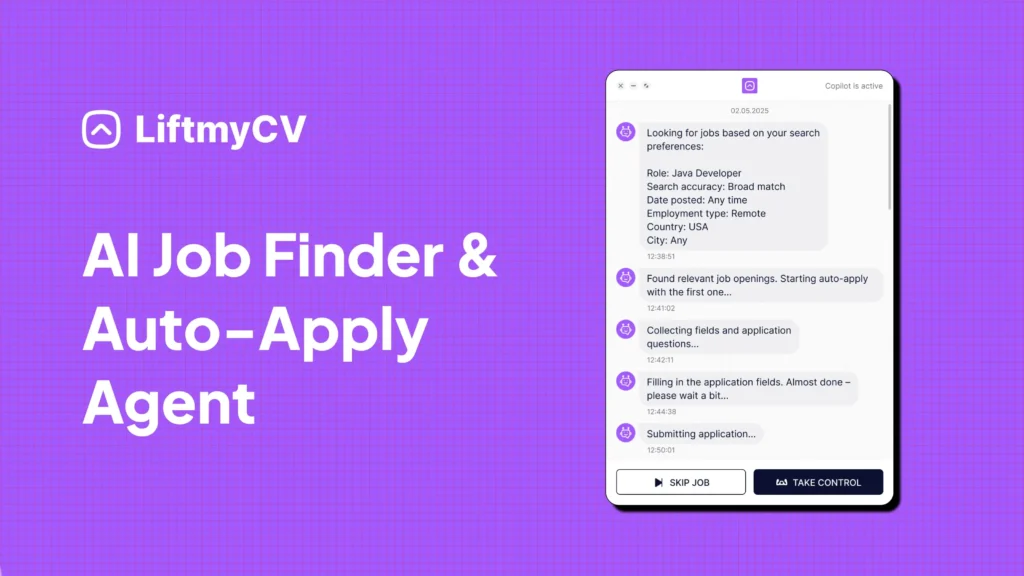
LiftmyCV Smart Apply Features:
- AI Matchmaker: Automatically finds job opportunities that align with your skills and goals.
- ATS-Optimized Profiles: Build application-ready profiles that stand out to applicant tracking systems.
- Instant Compatibility Scoring: Get real-time feedback on how your resume matches a job post – and how to improve it.
- Cross-Platform Integration: Seamlessly connects with top job boards, including LinkedIn, Lever, Monster, Recruitee, Ashby, Breezy HR, and Workable.
- Intelligent Form Filler: Autofills application fields with precision, formatted for ATS readability.
- Controlled Auto-Apply: Set daily application limits using a simple Chrome extension to stay in control.
- Application Tracking Dashboard: Monitor your application history, track outcomes, and see what’s working.
- Flexible Pricing: Choose between pay-as-you-go or a subscription plan – whatever fits your job search pace and budget.
Available Submission Plans:
| Plan | CV submission | Cost | Model |
|---|---|---|---|
| Free plan | 3 AI Auto-Applies | $0 | Free |
| Subscription | 50 AI Auto-Applies /mo | $4.99 | Subscription |
| 500 Lifts | 500 AI Auto-Applies | $14.99 | Pay-as-you-go |
| 1000 Lifts | 1000 AI Auto-Applies | $24.99 | Pay-as-you-go |
| 2000 Lifts | 2,000 AI Auto-Applies | $39.99 | Pay-as-you-go |
Additionally, LiftmyCV lets you filter job searches by role, location, and work environment (remote, hybrid, or in-person). The platform ensures consistent formatting across every application and helps manage the job hunt without burnout.
Try LiftmyCV for free – no subscription required!
BONUS: How To Use ChatGPT For Interviews: 10 ChatGPT Job Interview Promts
Conclusion
ChatGPT has changed how people prepare for job interviews in 2025, offering a 24/7 tool to help you practice and refine your skills. By using it effectively, you can improve your performance and feel more confident during interviews. Whether you’re working on STAR-format answers, tackling role-specific questions, or running through mock interviews, this tailored approach helps you fine-tune your responses and boost your overall presence.
Here’s how to get the most out of your preparation:
- Start Early: Give yourself at least two weeks to practice with ChatGPT before your interview.
- Be Specific: Include clear details about the role and company when setting up your prompts.
- Practice Consistently: Gradually increase the complexity of your mock interviews over time.
- Refine Your Answers: Use ChatGPT’s feedback to polish and improve your responses.
These strategies build on the methods we’ve covered earlier in the article.
Combining AI-powered tools like ChatGPT with thorough research and a personalized approach ensures you’re fully prepared to make a great impression. You can also explore LiftmyCV‘s AI-driven interview tools, which work alongside ChatGPT to take your preparation to the next level.


Read Next
Top 10 Interview Questions & Best Answer Tips by Experts
Ace your next interview with expert-backed answers to the top 10 interview questions. Get proven tips, real examples, and winning strategies for 2025.
Follow-Up Emails After Interviews | Templates + AI Writing Tips
Discover how to write follow-up emails after interviews and applications using AI tools. Get templates and tips to improve your chances.
How to Answer Interview Questions Like a Pro — Expert Tips & Examples
Learn how to answer common interview questions with expert tips, examples, and proven methods to boost your confidence and get hired faster.